---
blogpost: true
date: Aug 9, 2022
title: Understanding Dask’s meta keyword argument
author: Pavithra Eswaramoorthy
tags: dataframe
---
If you have worked with Dask DataFrames or Dask Arrays, you have probably come across the `meta` keyword argument. Perhaps, while using methods like `apply()`:
```python
import dask
import pandas as pd
ddf = dask.datasets.timeseries()
def my_custom_arithmetic(r):
if r.id > 1000:
return r.x * r.x + r.y + r.y
else:
return 0
ddf["my_computation"] = ddf.apply(
my_custom_arithmetic, axis=1, meta=pd.Series(dtype="float64")
)
ddf.head()
# Output:
#
# id name x y my_computation
# timestamp
# 2000-01-01 00:00:00 1055 Victor -0.575374 0.868320 2.067696
# 2000-01-01 00:00:01 994 Zelda 0.963684 0.972240 0.000000
# 2000-01-01 00:00:02 982 George -0.997531 -0.876222 0.000000
# 2000-01-01 00:00:03 981 Ingrid 0.852159 -0.419733 0.000000
# 2000-01-01 00:00:04 1029 Jerry -0.839431 -0.736572 -0.768500
```
You might have also seen one or more of the following warnings/errors:
```
UserWarning: You did not provide metadata, so Dask is running your function on a small dataset to guess output types. It is possible that Dask will guess incorrectly.
```
```
UserWarning: `meta` is not specified, inferred from partial data. Please provide `meta` if the result is unexpected.
```
```
ValueError: Metadata inference failed in …
```
If the above messages look familiar, this blog post is for you. :)
We will discuss:
- what the is `meta` keyword argument,
- why does Dask need `meta`, and
- how to use it effectively.
We will look at `meta` mainly in the context of Dask DataFrames, however, similar principles also apply to Dask Arrays.
## What is `meta`?
Before answering this, let's quickly discuss [Dask DataFrames](https://docs.dask.org/en/stable/dataframe.html).
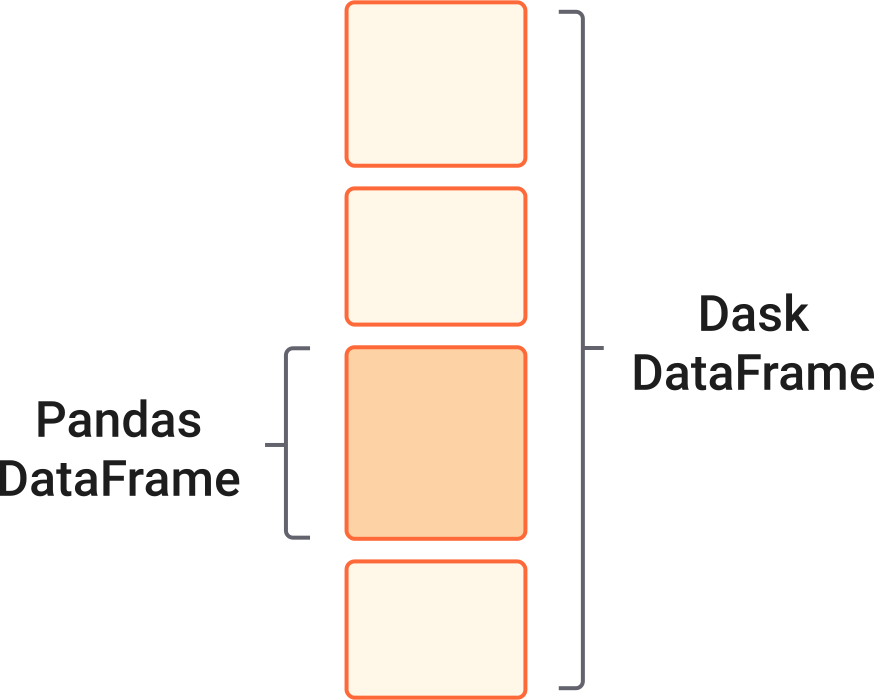
A Dask DataFrame is a lazy object composed of multiple [pandas DataFrames](https://pandas.pydata.org/pandas-docs/stable/reference/api/pandas.DataFrame.html), where each pandas DataFrame is called a "partition". These are stacked along the index and Dask keeps track of these partitions using "divisions", which is a tuple representing the start and end index of each partition.
 When you create a Dask DataFrame, you usually see something like the following:
```python
>>> import pandas as pd
>>> import dask.dataframe as dd
>>> ddf = dd.DataFrame.from_dict(
... {
... "x": range(6),
... "y": range(10, 16),
... },
... npartitions=2,
... )
>>> ddf
Dask DataFrame Structure:
x y
npartitions=2
0 int64 int64
3 ... ...
5 ... ...
Dask Name: from_pandas, 2 tasks
```
Here, Dask has created the structure of the DataFrame using some "metadata" information about the _column names_ and their _datatypes_. This metadata information is called `meta`. Dask uses `meta` for understanding Dask operations and creating accurate task graphs (i.e., the logic of your computation).
The `meta` _keyword argument_ in various Dask DataFrame functions allows you to explicitly share this metadata information with Dask. Note that the keyword argument is concerned with the metadata of the _output_ of those functions.
## Why does Dask need `meta`?
Dask computations are evaluated _lazily_. This means Dask creates the logic and flow, called task graph, of the computation immediately, but evaluates them only when necessary -- usually, on calling `.compute()`.
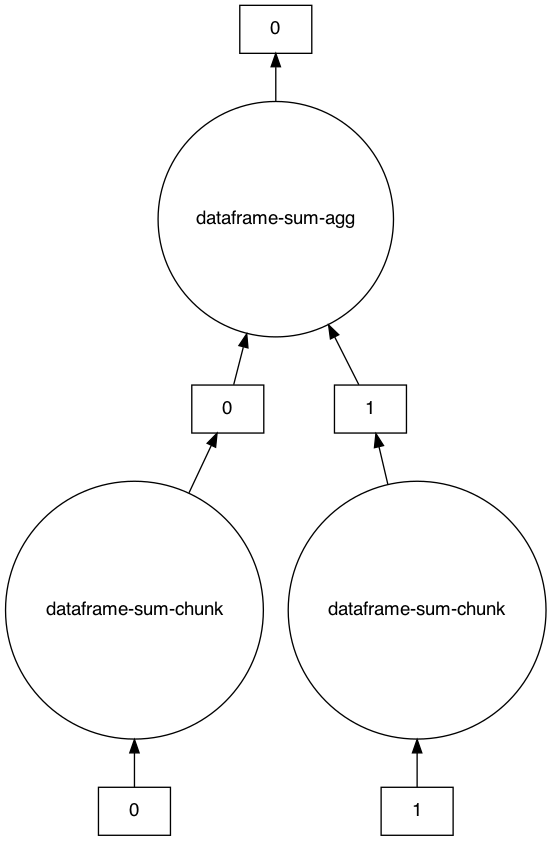
An example task graph generated to compute the sum of the DataFrame:
```python
>>> s = ddf.sum()
>>> s
Dask Series Structure:
npartitions=1
x int64
y ...
dtype: int64
Dask Name: dataframe-sum-agg, 5 tasks
>>> s.visualize()
```
When you create a Dask DataFrame, you usually see something like the following:
```python
>>> import pandas as pd
>>> import dask.dataframe as dd
>>> ddf = dd.DataFrame.from_dict(
... {
... "x": range(6),
... "y": range(10, 16),
... },
... npartitions=2,
... )
>>> ddf
Dask DataFrame Structure:
x y
npartitions=2
0 int64 int64
3 ... ...
5 ... ...
Dask Name: from_pandas, 2 tasks
```
Here, Dask has created the structure of the DataFrame using some "metadata" information about the _column names_ and their _datatypes_. This metadata information is called `meta`. Dask uses `meta` for understanding Dask operations and creating accurate task graphs (i.e., the logic of your computation).
The `meta` _keyword argument_ in various Dask DataFrame functions allows you to explicitly share this metadata information with Dask. Note that the keyword argument is concerned with the metadata of the _output_ of those functions.
## Why does Dask need `meta`?
Dask computations are evaluated _lazily_. This means Dask creates the logic and flow, called task graph, of the computation immediately, but evaluates them only when necessary -- usually, on calling `.compute()`.
An example task graph generated to compute the sum of the DataFrame:
```python
>>> s = ddf.sum()
>>> s
Dask Series Structure:
npartitions=1
x int64
y ...
dtype: int64
Dask Name: dataframe-sum-agg, 5 tasks
>>> s.visualize()
```
 ```python
>>> s.compute()
x 15
y 75
dtype: int64
```
This is a single operation, but Dask workflows usually have multiple such operation chained together. Therefore, to create the task graph effectively, Dask needs to know the strucutre and datatypes of the DataFame after each operation. Especially because Dask does not know the actual values/structure of the DataFrame yet.
This is where `meta` is comes in.
In the above example, the Dask DataFrame changed into a Series after `sum()`. Dask knows this (even before we call `compute()`) only becasue of `meta`.
Internally, `meta` is represented as an empty pandas [DataFrame](https://docs.dask.org/en/stable/dataframe.html) or [Series](https://pandas.pydata.org/pandas-docs/stable/reference/api/pandas.Series.html), which has the same structure as the Dask DataFrame. To learn more about how `meta` is defined internally, check out the [DataFrame Internal Design documentation](https://docs.dask.org/en/stable/dataframe-design.html#metadata).
To see the actual metadata information for a collection, you can look at the `._meta` attribute[1]:
```python
>>> s._meta
Series([], dtype: int64)
```
## How to specify `meta`?
You can specify `meta` in a few different ways, but the recommended way for Dask DataFrame is:
> "An empty `pd.DataFrame` or `pd.Series` that matches the dtypes and column names of the output."
>
> ~ [`DataFrame.apply()` docstring](https://docs.dask.org/en/stable/generated/dask.dataframe.DataFrame.apply.html)
For example:
```python
>>> meta_df = pd.DataFrame(columns=["x", "y"], dtype=int)
>>> meta_df
Empty DataFrame
Columns: [x, y]
Index: []
>>> ddf2 = ddf.apply(lambda x: x, axis=1, meta=meta_df).compute()
>>> ddf2
x y
0 0 0
1 1 1
2 2 2
3 0 3
4 1 4
5 2 5
```
The [other ways you can describe `meta`](https://docs.dask.org/en/stable/dataframe-design.html#metadata) are:
- For a DataFrame, you can specify `meta` as a:
- Python dictionary: `{column_name_1: dtype_1, column_name_2: dtype_2, …}`
- Iterable of tuples: `[(column_name_1, dtype_1), (columns_name_2, dtype_2, …)]`
**Note** that while describing `meta` as shown above, using a dictionary or iterable of tuples, the order in which you mention column names is important. Dask will use the same order to create the pandas DataFrame for `meta`. If the orders don't match, you will see the following error:
```
ValueError: The columns in the computed data do not match the columns in the provided metadata
```
- For a Series output, you can specify `meta` using a single tuple: `(coulmn_name, dtype)`
You should **not** describe `meta` using just a `dtype` (like: `meta="int64"`), even for scalar outputs. If you do, you will see the following warning:
```
FutureWarning: Meta is not valid, `map_partitions` and `map_overlap` expects output to be a pandas object. Try passing a pandas object as meta or a dict or tuple representing the (name, dtype) of the columns. In the future the meta you passed will not work.
```
During operations like `map_partitions` or `apply` (which uses `map_partitions` internally), Dask coerces the scalar output of each partition into a pandas object. So, the output of functions that take `meta` will never be scalar.
For example:
```python
>>> ddf = ddf.repartition(npartitions=1)
>>> result = ddf.map_partitions(lambda x: len(x)).compute()
>>> type(result)
pandas.core.series.Series
```
Here, the Dask DataFrame `ddf` has only one partition. Hence, `len(x)` on that one partition would result in a scalar output of integer dtype. However, when we compute it, we see a pandas Series. This confirms that Dask is coercing the outputs to pandas objects.
**Another note**, Dask Arrays may not always do this conversion. You can look at the [API reference](https://docs.dask.org/en/stable/array-api.html) for your particular Array operation for details.
```python
>>> import numpy as np
>>> import dask.array as da
>>> my_arr = da.random.random(10)
>>> my_arr.map_blocks(lambda x: len(x)).compute()
10
```
## `meta` does not _force_ the structure or dtypes
`meta` can be thought of as a suggestion to Dask. Dask uses this `meta` to generate the task graph until it can infer the actual metadata from the values. It **does not** force the output to have the structure or dtype of the specified `meta`.
Consider the following example, and remember that we defined `ddf` with `x` and `y` column names in the previous sections.
If we provide different column names (`a` and `b`) in the `meta` description, Dask uses these new names to create the task graph:
```python
>>> meta_df = pd.DataFrame(columns=["a", "b"], dtype=int)
>>> result = ddf.apply(lambda x:x*x, axis=1, meta=meta_df)
>>> result
Dask DataFrame Structure:
a b
npartitions=2
0 int64 int64
3 ... ...
5 ... ...
Dask Name: apply, 4 tasks
```
However, if we compute `result`, we will get the following error:
```
>>> result.compute()
ValueError: The columns in the computed data do not match the columns in the provided metadata
Extra: ['x', 'y']
Missing: ['a', 'b']
```
While computing, Dask evaluates the actual metadata with columns `x` and `y`. This does not match the `meta` that we provided, and hence, Dask raises a helpful error message. Notice how Dask does not change the output to have `a` and `b` here, rather uses `a` and `b` column names only for intermediate task graphs.
## Using `._meta` directly
In some rare case, you can also set the `._meta` attribute[1] directly for a Dask DataFrame. For example, if the DataFrame was created with incorrect dtypes, like:
```python
>>> ddf = dd.DataFrame.from_dict(
... {
... "x": range(6),
... "y": range(10, 16),
... },
... dtype="object", # Note the “object” dtype
... npartitions=2,
... )
>>> ddf
Dask DataFrame Structure:
x y
npartitions=2
0 object object
3 ... ...
5 ... ...
Dask Name: from_pandas, 2 tasks
```
The values are clearly integers but the dtype says `object`, so we can't perform integer operations like addition:
```python
>>> add = ddf + 2
ValueError: Metadata inference failed in `add`.
Original error is below:
------------------------
TypeError('can only concatenate str (not "int") to str')
```
Here, we can explicitly define `._meta`[1]:
```python
>>> ddf._meta = pd.DataFrame(columns=["x", "y"], dtype="int64")
```
Then, perform the addition:
```python
>>> add = ddf + 2
>>> add
Dask DataFrame Structure:
x y
npartitions=2
0 int64 int64
3 ... ...
5 ... ...
Dask Name: add, 4 tasks
```
Thanks for reading!
Have you run into issues with `meta` before? Please let us know on [Discourse](https://dask.discourse.group/), and we will consider including it here, or updating the Dask documentation. :)
[1] NOTE: `._meta` is not a public property, so we recommend using it only when necessary. There is [an ongoing discussion](https://github.com/dask/dask/issues/8585) around creating public methods to get, set, and view the information in `._meta`, and this blog post will be updated to use the public methods when they're created.
```python
>>> s.compute()
x 15
y 75
dtype: int64
```
This is a single operation, but Dask workflows usually have multiple such operation chained together. Therefore, to create the task graph effectively, Dask needs to know the strucutre and datatypes of the DataFame after each operation. Especially because Dask does not know the actual values/structure of the DataFrame yet.
This is where `meta` is comes in.
In the above example, the Dask DataFrame changed into a Series after `sum()`. Dask knows this (even before we call `compute()`) only becasue of `meta`.
Internally, `meta` is represented as an empty pandas [DataFrame](https://docs.dask.org/en/stable/dataframe.html) or [Series](https://pandas.pydata.org/pandas-docs/stable/reference/api/pandas.Series.html), which has the same structure as the Dask DataFrame. To learn more about how `meta` is defined internally, check out the [DataFrame Internal Design documentation](https://docs.dask.org/en/stable/dataframe-design.html#metadata).
To see the actual metadata information for a collection, you can look at the `._meta` attribute[1]:
```python
>>> s._meta
Series([], dtype: int64)
```
## How to specify `meta`?
You can specify `meta` in a few different ways, but the recommended way for Dask DataFrame is:
> "An empty `pd.DataFrame` or `pd.Series` that matches the dtypes and column names of the output."
>
> ~ [`DataFrame.apply()` docstring](https://docs.dask.org/en/stable/generated/dask.dataframe.DataFrame.apply.html)
For example:
```python
>>> meta_df = pd.DataFrame(columns=["x", "y"], dtype=int)
>>> meta_df
Empty DataFrame
Columns: [x, y]
Index: []
>>> ddf2 = ddf.apply(lambda x: x, axis=1, meta=meta_df).compute()
>>> ddf2
x y
0 0 0
1 1 1
2 2 2
3 0 3
4 1 4
5 2 5
```
The [other ways you can describe `meta`](https://docs.dask.org/en/stable/dataframe-design.html#metadata) are:
- For a DataFrame, you can specify `meta` as a:
- Python dictionary: `{column_name_1: dtype_1, column_name_2: dtype_2, …}`
- Iterable of tuples: `[(column_name_1, dtype_1), (columns_name_2, dtype_2, …)]`
**Note** that while describing `meta` as shown above, using a dictionary or iterable of tuples, the order in which you mention column names is important. Dask will use the same order to create the pandas DataFrame for `meta`. If the orders don't match, you will see the following error:
```
ValueError: The columns in the computed data do not match the columns in the provided metadata
```
- For a Series output, you can specify `meta` using a single tuple: `(coulmn_name, dtype)`
You should **not** describe `meta` using just a `dtype` (like: `meta="int64"`), even for scalar outputs. If you do, you will see the following warning:
```
FutureWarning: Meta is not valid, `map_partitions` and `map_overlap` expects output to be a pandas object. Try passing a pandas object as meta or a dict or tuple representing the (name, dtype) of the columns. In the future the meta you passed will not work.
```
During operations like `map_partitions` or `apply` (which uses `map_partitions` internally), Dask coerces the scalar output of each partition into a pandas object. So, the output of functions that take `meta` will never be scalar.
For example:
```python
>>> ddf = ddf.repartition(npartitions=1)
>>> result = ddf.map_partitions(lambda x: len(x)).compute()
>>> type(result)
pandas.core.series.Series
```
Here, the Dask DataFrame `ddf` has only one partition. Hence, `len(x)` on that one partition would result in a scalar output of integer dtype. However, when we compute it, we see a pandas Series. This confirms that Dask is coercing the outputs to pandas objects.
**Another note**, Dask Arrays may not always do this conversion. You can look at the [API reference](https://docs.dask.org/en/stable/array-api.html) for your particular Array operation for details.
```python
>>> import numpy as np
>>> import dask.array as da
>>> my_arr = da.random.random(10)
>>> my_arr.map_blocks(lambda x: len(x)).compute()
10
```
## `meta` does not _force_ the structure or dtypes
`meta` can be thought of as a suggestion to Dask. Dask uses this `meta` to generate the task graph until it can infer the actual metadata from the values. It **does not** force the output to have the structure or dtype of the specified `meta`.
Consider the following example, and remember that we defined `ddf` with `x` and `y` column names in the previous sections.
If we provide different column names (`a` and `b`) in the `meta` description, Dask uses these new names to create the task graph:
```python
>>> meta_df = pd.DataFrame(columns=["a", "b"], dtype=int)
>>> result = ddf.apply(lambda x:x*x, axis=1, meta=meta_df)
>>> result
Dask DataFrame Structure:
a b
npartitions=2
0 int64 int64
3 ... ...
5 ... ...
Dask Name: apply, 4 tasks
```
However, if we compute `result`, we will get the following error:
```
>>> result.compute()
ValueError: The columns in the computed data do not match the columns in the provided metadata
Extra: ['x', 'y']
Missing: ['a', 'b']
```
While computing, Dask evaluates the actual metadata with columns `x` and `y`. This does not match the `meta` that we provided, and hence, Dask raises a helpful error message. Notice how Dask does not change the output to have `a` and `b` here, rather uses `a` and `b` column names only for intermediate task graphs.
## Using `._meta` directly
In some rare case, you can also set the `._meta` attribute[1] directly for a Dask DataFrame. For example, if the DataFrame was created with incorrect dtypes, like:
```python
>>> ddf = dd.DataFrame.from_dict(
... {
... "x": range(6),
... "y": range(10, 16),
... },
... dtype="object", # Note the “object” dtype
... npartitions=2,
... )
>>> ddf
Dask DataFrame Structure:
x y
npartitions=2
0 object object
3 ... ...
5 ... ...
Dask Name: from_pandas, 2 tasks
```
The values are clearly integers but the dtype says `object`, so we can't perform integer operations like addition:
```python
>>> add = ddf + 2
ValueError: Metadata inference failed in `add`.
Original error is below:
------------------------
TypeError('can only concatenate str (not "int") to str')
```
Here, we can explicitly define `._meta`[1]:
```python
>>> ddf._meta = pd.DataFrame(columns=["x", "y"], dtype="int64")
```
Then, perform the addition:
```python
>>> add = ddf + 2
>>> add
Dask DataFrame Structure:
x y
npartitions=2
0 int64 int64
3 ... ...
5 ... ...
Dask Name: add, 4 tasks
```
Thanks for reading!
Have you run into issues with `meta` before? Please let us know on [Discourse](https://dask.discourse.group/), and we will consider including it here, or updating the Dask documentation. :)
[1] NOTE: `._meta` is not a public property, so we recommend using it only when necessary. There is [an ongoing discussion](https://github.com/dask/dask/issues/8585) around creating public methods to get, set, and view the information in `._meta`, and this blog post will be updated to use the public methods when they're created.