---
blogpost: true
date: Feb 17, 2022
title: How to run different worker types with the Dask Helm Chart
author: Matthew Murray (NVIDIA)
tags: Kubernetes, Helm
---
## Introduction
Today, we’ll learn how to deploy [Dask](https://dask.org/) on a [Kubernetes](https://kubernetes.io/) cluster with the Dask Helm Chart and then run and scale different worker types with annotations.
### What is the Dask Helm Chart?
The [Dask Helm Chart](https://github.com/dask/helm-chart) is a convenient way of deploying Dask using [Helm](https://helm.sh/), a package manager for Kubernetes applications. After deploying Dask with the Dask Helm Chart, we can connect to our HelmCluster and begin scaling out workers.
### What is Dask Kubernetes?
[Dask Kubernetes](https://kubernetes.dask.org/en/latest/) allows you to deploy and manage your Dask deployment on a Kubernetes cluster. The Dask Kubernetes Python package has a `HelmCluster` class (among other things) that will enable you to manage your cluster from Python. In this tutorial, we will use the `HelmCluster` as our cluster manager.
### Prerequisites
- To have Helm installed and be able to run `helm` commands
- To have a running Kubernetes cluster. It doesn't matter whether you're running Kubernetes locally using [MiniKube](https://minikube.sigs.k8s.io/docs/) or [Kind](https://kind.sigs.k8s.io/) or you're using a cloud provider like AWS or GCP. But your cluster will need to have access to [GPU nodes](https://kubernetes.io/docs/tasks/manage-gpus/scheduling-gpus/) to run GPU workers. You’ll also need to install [RAPIDS](https://rapids.ai/) to run the GPU worker example.
- To have [kubectl](https://kubernetes.io/docs/tasks/tools/) installed. Although this is not required.
That's it, let's get started!
## Install Dask Kubernetes
From the [documentation](https://kubernetes.dask.org/en/latest/installing.html),
```console
pip install dask-kubernetes --upgrade
```
or
```console
conda install dask-kubernetes -c conda-forge
```
## Install the Dask Helm Chart
First, deploy Dask on Kubernetes with Helm:
```console
helm repo add dask https://helm.dask.org/
helm repo update
helm install my-dask dask/dask
```
Now you should have Dask running on your Kubernetes cluster. If you have kubectl installed, you can run `kubectl get all -n default`
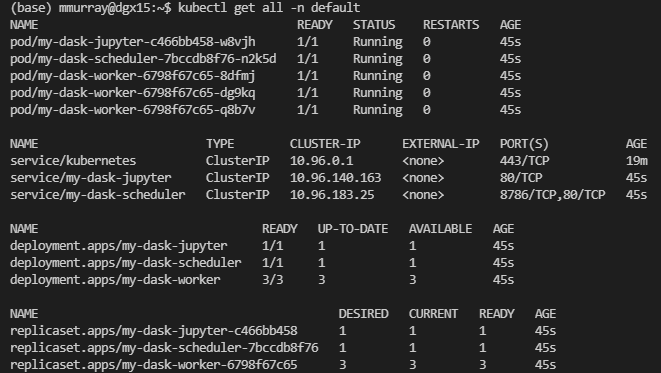 You can see that we've created a few resources! The main thing to know is that we start with three dask workers.
## Add GPU worker group to our Dask Deployment
The Helm Chart has default values that it uses out of the box to deploy our Dask cluster on Kubernetes. But now, because we want to create some GPU workers, we need to change the default values in the Dask Helm Chart. To do this, we can create a copy of the current [`values.yaml`](https://github.com/dask/helm-chart/blob/main/dask/values.yaml), update it to add a GPU worker group and then update our helm deployment.
- First, you can copy the contents of the `values.yaml` file in the Dask Helm Chart and create a new file called `my-values.yaml`
- Next, we’re going to update the section in the file called `additional_worker_groups`. The section looks like this:
```yaml
additional_worker_groups: [] # Additional groups of workers to create
# - name: high-mem-workers # Dask worker group name.
# resources:
# limits:
# memory: 32G
# requests:
# memory: 32G
# ...
# (Defaults will be taken from the primary worker configuration)
```
- Now we’re going to edit the section to look like this:
```yaml
additional_worker_groups: # Additional groups of workers to create
- name: gpu-workers # Dask worker group name.
replicas: 1
image:
repository: rapidsai/rapidsai-core
tag: 21.12-cuda11.5-runtime-ubuntu20.04-py3.8
dask_worker: dask-cuda-worker
extraArgs:
- --resources
- "GPU=1"
resources:
limits:
nvidia.com/gpu: 1
```
- Now we can update our deployment with our new values in `my-values.yaml`
```console
helm upgrade -f my-values.yaml my-dask dask/dask
```
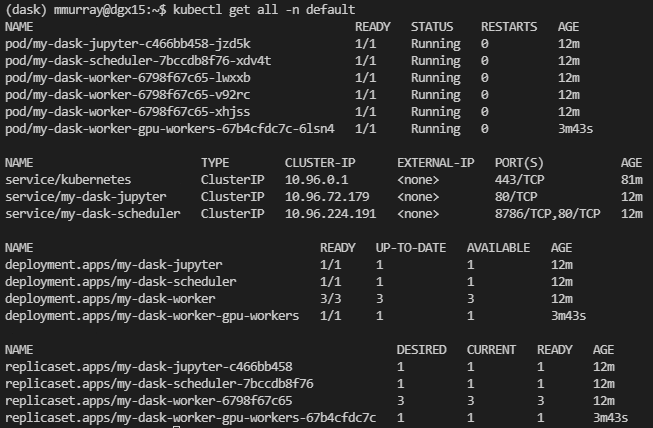
- Again, you can run `kubectl get all -n default`, and you’ll see our new GPU worker pod running:
You can see that we've created a few resources! The main thing to know is that we start with three dask workers.
## Add GPU worker group to our Dask Deployment
The Helm Chart has default values that it uses out of the box to deploy our Dask cluster on Kubernetes. But now, because we want to create some GPU workers, we need to change the default values in the Dask Helm Chart. To do this, we can create a copy of the current [`values.yaml`](https://github.com/dask/helm-chart/blob/main/dask/values.yaml), update it to add a GPU worker group and then update our helm deployment.
- First, you can copy the contents of the `values.yaml` file in the Dask Helm Chart and create a new file called `my-values.yaml`
- Next, we’re going to update the section in the file called `additional_worker_groups`. The section looks like this:
```yaml
additional_worker_groups: [] # Additional groups of workers to create
# - name: high-mem-workers # Dask worker group name.
# resources:
# limits:
# memory: 32G
# requests:
# memory: 32G
# ...
# (Defaults will be taken from the primary worker configuration)
```
- Now we’re going to edit the section to look like this:
```yaml
additional_worker_groups: # Additional groups of workers to create
- name: gpu-workers # Dask worker group name.
replicas: 1
image:
repository: rapidsai/rapidsai-core
tag: 21.12-cuda11.5-runtime-ubuntu20.04-py3.8
dask_worker: dask-cuda-worker
extraArgs:
- --resources
- "GPU=1"
resources:
limits:
nvidia.com/gpu: 1
```
- Now we can update our deployment with our new values in `my-values.yaml`
```console
helm upgrade -f my-values.yaml my-dask dask/dask
```
- Again, you can run `kubectl get all -n default`, and you’ll see our new GPU worker pod running:
 - Now we can open up a jupyter notebook or any editor to write some code.
## Scaling the workers Up/Down
We'll start by importing the `HelmCluster` cluster manager from Dask Kubernetes. Next, we connect our cluster manager to our dask cluster by passing the `release_name` of our Dask cluster as an argument. That's it, the `HelmCluster` automatically port-forwards the scheduler to us and can give us quick access to [logs](https://kubernetes.dask.org/en/latest/helmcluster.html#dask_kubernetes.HelmCluster.get_logs). Next, we're going to scale our Dask cluster.
```python
from dask_kubernetes import HelmCluster
cluster = HelmCluster(release_name="my-dask")
cluster
```
- Now we can open up a jupyter notebook or any editor to write some code.
## Scaling the workers Up/Down
We'll start by importing the `HelmCluster` cluster manager from Dask Kubernetes. Next, we connect our cluster manager to our dask cluster by passing the `release_name` of our Dask cluster as an argument. That's it, the `HelmCluster` automatically port-forwards the scheduler to us and can give us quick access to [logs](https://kubernetes.dask.org/en/latest/helmcluster.html#dask_kubernetes.HelmCluster.get_logs). Next, we're going to scale our Dask cluster.
```python
from dask_kubernetes import HelmCluster
cluster = HelmCluster(release_name="my-dask")
cluster
```
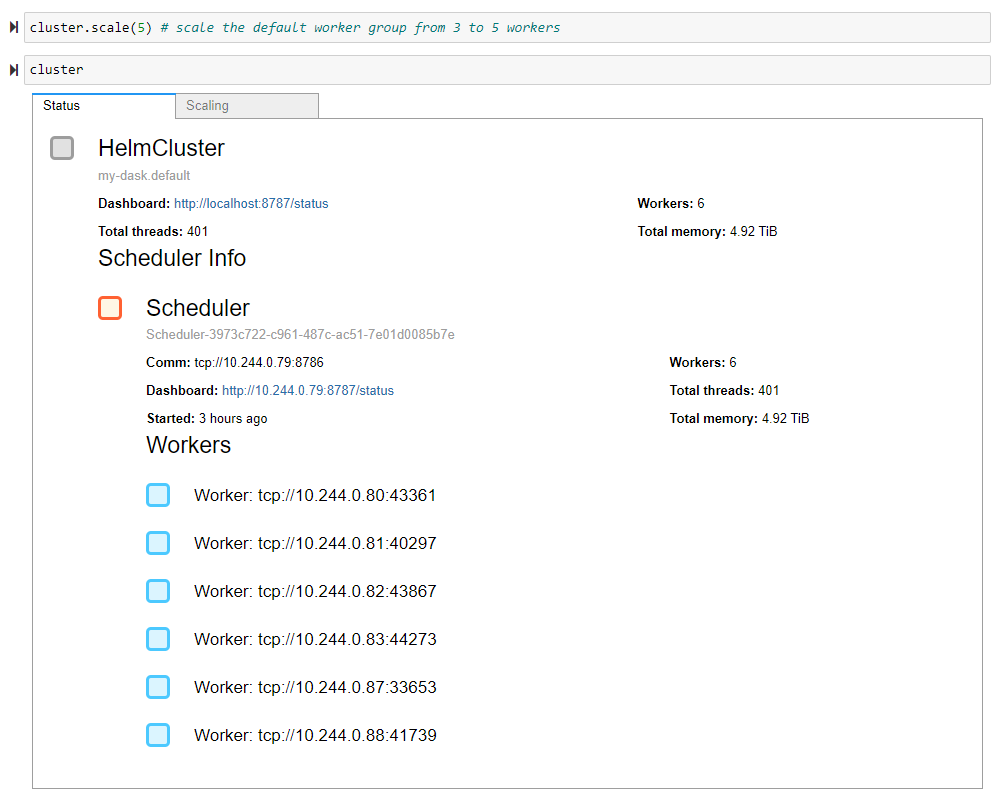
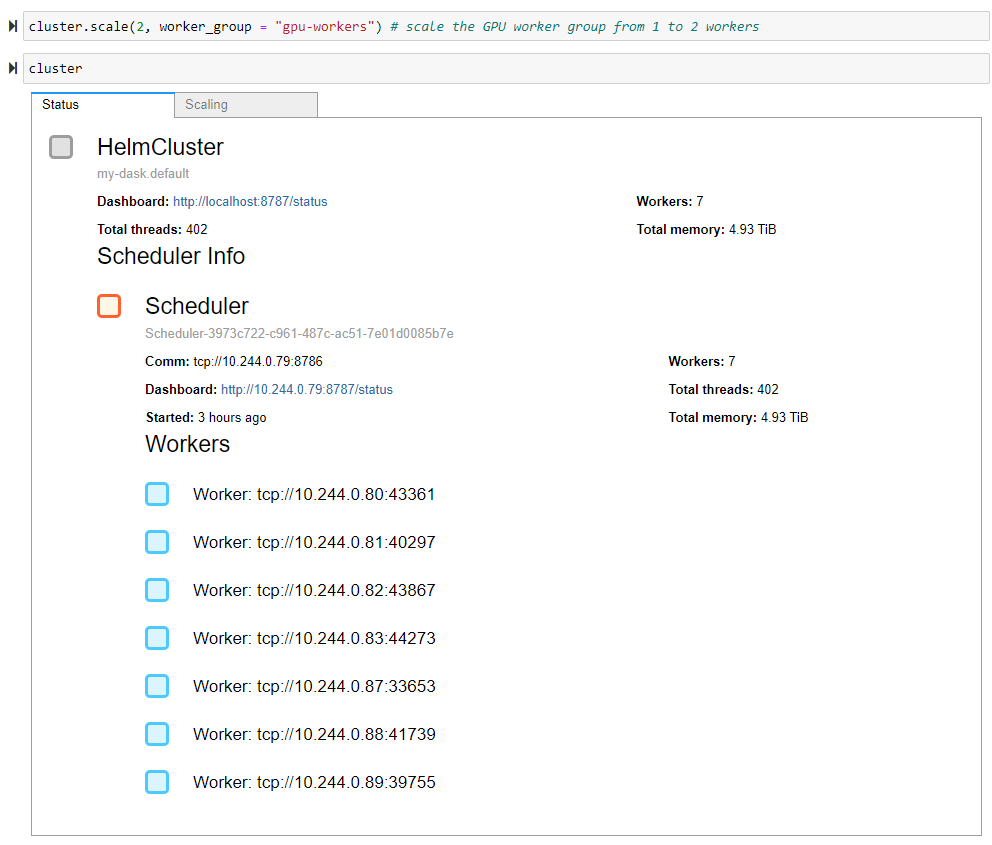
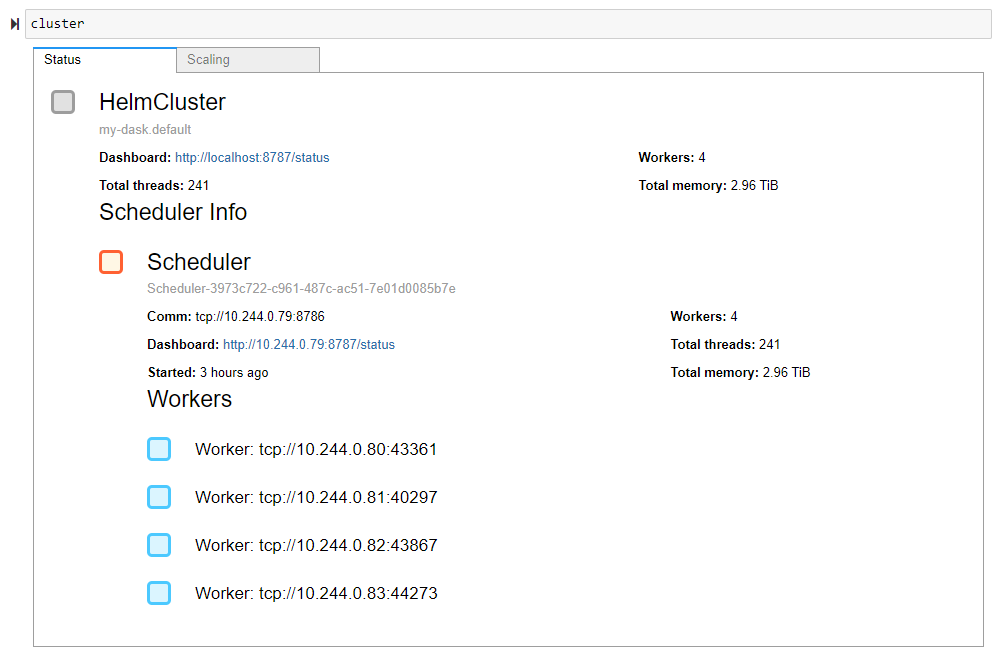 To scale our cluster, we need to provide our desired number of workers as an argument to the `HelmCluster`'s `scale` method. By default, the `scale` method scales our default worker group. You can see in the first example we scaled the default worker group from three to five workers, giving us six workers in total. In the second example, we use the handy `worker_group` keyword argument to scale our GPU worker group from one to two workers, giving us seven workers in total.
```python
cluster.scale(5) # scale the default worker group from 3 to 5 workers
cluster
```
To scale our cluster, we need to provide our desired number of workers as an argument to the `HelmCluster`'s `scale` method. By default, the `scale` method scales our default worker group. You can see in the first example we scaled the default worker group from three to five workers, giving us six workers in total. In the second example, we use the handy `worker_group` keyword argument to scale our GPU worker group from one to two workers, giving us seven workers in total.
```python
cluster.scale(5) # scale the default worker group from 3 to 5 workers
cluster
```
 ```python
cluster.scale(2, worker_group = "gpu-workers") # scale the GPU worker group from 1 to 2 workers
cluster
```
```python
cluster.scale(2, worker_group = "gpu-workers") # scale the GPU worker group from 1 to 2 workers
cluster
```
 ## Example: Finding the average New York City taxi trip distance in April 2020
This example will find the average distance traveled by a yellow taxi in New York City in April 2020 using the [NY Taxi Dataset](https://www1.nyc.gov/site/tlc/about/tlc-trip-record-data.page). We'll compute this distance in two different ways. The first way will employ our default dask workers, and the second way will utilize our GPU worker group. We'll load the NY Taxi dataset as a data frame in both examples and compute the `mean` of the `trip_distance` column. The main difference is that we need to run our GPU-specific computations using our GPU worker group. We can do this by utilizing Dask annotations.
```python
import dask.dataframe as dd
import dask
link = "https://s3.amazonaws.com/nyc-tlc/trip+data/yellow_tripdata_2020-04.csv"
ddf = dd.read_csv(link, assume_missing=True)
avg_trip_distance = ddf['trip_distance'].mean().compute()
print(f"In January 2021, the average trip distance for yellow taxis was {avg_trip_distance} miles.")
with dask.annotate(resources={'GPU': 1}):
import dask_cudf, cudf
dask_cdf = ddf.map_partitions(cudf.from_pandas)
avg_trip_distance = dask_cdf['trip_distance'].mean().compute()
print(f"In January 2021, the average trip distance for yellow taxis was {avg_trip_distance} miles.")
```
## Closing
That's it! We've deployed Dask with Helm, created an additional GPU worker type, and used our workers to run an example calculation using the NY Taxi dataset. We've learned several new things:
1. The Dask Helm Chart lets you create multiple worker groups with different worker types. We saw this when we made two different groups of Dask Workers: CPU and GPU workers.
2. You can run specific computations on your workers of choice with annotations. Our example computed the average taxi distance using the RAPIDS libraries `cudf` and `dask_cudf` on our GPU worker group.
3. The `HelmCluster` cluster manager in Dask Kubernetes lets you scale your worker groups quickly from python. We scaled our GPU worker group by conveniently passing the worker group name as a keyword argument in the `HelmCluster` scale method.
## Future Work
We're thinking a lot about the concept of worker groups in the Dask community. Until now, most Dask deployments have homogenous workers, but as Dask users push Dask further, there is a growing demand for heterogeneous clusters with special-purpose workers. So we want to add worker groups throughout Dask.
## Example: Finding the average New York City taxi trip distance in April 2020
This example will find the average distance traveled by a yellow taxi in New York City in April 2020 using the [NY Taxi Dataset](https://www1.nyc.gov/site/tlc/about/tlc-trip-record-data.page). We'll compute this distance in two different ways. The first way will employ our default dask workers, and the second way will utilize our GPU worker group. We'll load the NY Taxi dataset as a data frame in both examples and compute the `mean` of the `trip_distance` column. The main difference is that we need to run our GPU-specific computations using our GPU worker group. We can do this by utilizing Dask annotations.
```python
import dask.dataframe as dd
import dask
link = "https://s3.amazonaws.com/nyc-tlc/trip+data/yellow_tripdata_2020-04.csv"
ddf = dd.read_csv(link, assume_missing=True)
avg_trip_distance = ddf['trip_distance'].mean().compute()
print(f"In January 2021, the average trip distance for yellow taxis was {avg_trip_distance} miles.")
with dask.annotate(resources={'GPU': 1}):
import dask_cudf, cudf
dask_cdf = ddf.map_partitions(cudf.from_pandas)
avg_trip_distance = dask_cdf['trip_distance'].mean().compute()
print(f"In January 2021, the average trip distance for yellow taxis was {avg_trip_distance} miles.")
```
## Closing
That's it! We've deployed Dask with Helm, created an additional GPU worker type, and used our workers to run an example calculation using the NY Taxi dataset. We've learned several new things:
1. The Dask Helm Chart lets you create multiple worker groups with different worker types. We saw this when we made two different groups of Dask Workers: CPU and GPU workers.
2. You can run specific computations on your workers of choice with annotations. Our example computed the average taxi distance using the RAPIDS libraries `cudf` and `dask_cudf` on our GPU worker group.
3. The `HelmCluster` cluster manager in Dask Kubernetes lets you scale your worker groups quickly from python. We scaled our GPU worker group by conveniently passing the worker group name as a keyword argument in the `HelmCluster` scale method.
## Future Work
We're thinking a lot about the concept of worker groups in the Dask community. Until now, most Dask deployments have homogenous workers, but as Dask users push Dask further, there is a growing demand for heterogeneous clusters with special-purpose workers. So we want to add worker groups throughout Dask.