---
blogpost: true
date: May 13, 2020
title: Large SVDs
author: Matthew Rocklin (Coiled), Ben Zaitlen (NVIDIA), Alistair Miles (Oxford University)
tags: GPU, array, CuPy
description: Dask + CuPy + Zarr + Genomics
---
## Summary
We perform Singular Value Decomposition (SVD) calculations on large datasets.
We modify the computation both by using fully precise and approximate methods,
and by using both CPUs and GPUs.
In the end we compute an approximate SVD of 200GB of simulated data and using a mutli-GPU machine in 15-20 seconds.
Then we run this from a dataset stored in the cloud
where we find that I/O is, predictably, a major bottleneck.
## SVD - The simple case
Dask arrays contain a relatively sophisticated SVD algorithm that works in the
tall-and-skinny or short-and-fat cases, but not so well in the roughly-square
case. It works by taking QR decompositions of each block of the array,
combining the R matrices, doing another smaller SVD on those, and then
performing some matrix multiplication to get back to the full result. It's
numerically stable and decently fast, assuming that the intermediate R
matrices of the QR decompositions mostly fit in memory.
The memory constraints here are that if you have an `n` by `m` tall and
skinny array (`n >> m`) cut into `k` blocks then you need to have about `m**2 * k` space. This is true in many cases, including typical PCA machine learning
workloads, where you have tabular data with a few columns (hundreds at most)
and many rows.
It's easy to use and quite robust.
```python
import dask.array as da
x = da.random.random((10000000, 20))
x
```
Array
Chunk
Bytes
1.60 GB
100.00 MB
Shape
(10000000, 20)
(625000, 20)
Count
16 Tasks
16 Chunks
Type
float64
numpy.ndarray
```python
u, s, v = da.linalg.svd(x)
```
This works fine in the short and fat case too (when you have far more columns
than rows) but we're always going to assume that one of your dimensions is
unchunked, and that the other dimension has chunks that are quite a bit
longer, otherwise, things might not fit into memory.
## Approximate SVD
If your dataset is large in both dimensions then the algorithm above won't work
as is. However, if you don't need exact results, or if you only need a few of
the components, then there are a number of excellent approximation algorithms.
Dask array has one of these approximation algorithms implemented in the
[da.linalg.svd_compressed](https://docs.dask.org/en/latest/array-api.html#dask.array.linalg.svd_compressed)
function. And with it we can compute the approximate SVD of very large
matrices.
We were recently working on a problem (explained below) and found that we were
still running out of memory when dealing with this algorithm. There were two
challenges that we ran into:
1. The algorithm requires multiple passes over the data, but the Dask task
scheduler was keeping the input matrix in memory after it had been loaded once
in order to avoid recomputation.
Things still worked, but Dask had to move the data to disk and back
repeatedly, which reduced performance significantly.
We resolved this by including explicit recomputation steps in the algorithm.
2. Related chunks of data would be loaded at different times, and so would
need to stick around longer than necessary to wait for their associated
chunks.
We resolved this by engaging task fusion as an optimization pass.
Before diving further into the technical solution
we quickly provide the use case that was motivating this work.
## Application - Genomics
Many studies are using genome sequencing to study genetic variation
between different individuals within a species. These includes
studies of human populations, but also other species such as mice,
mosquitoes or disease-causing parasites. These studies will, in
general, find a large number of sites in the genome sequence where
individuals differ from each other. For example, humans have more
than 100 million variable sites in the genome, and modern studies
like the [UK BioBank](https://www.ukbiobank.ac.uk/) are working towards
sequencing the genomes of 1 million individuals or more.
In diploid species like humans, mice or mosquitoes, each individual
carries two genome sequences, one inherited from each parent. At each
of the 100 million variable genome sites there will be two or more
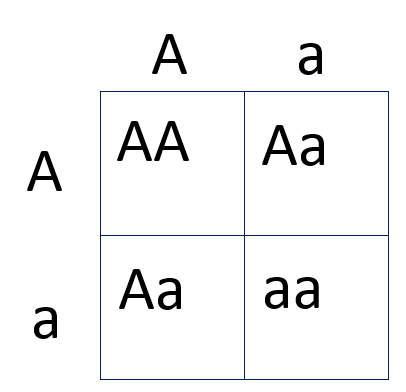
"alleles" that a single genome might carry. One way to think about
this is via the [Punnett
square](https://en.wikipedia.org/wiki/Punnett_square), which
represents the different possible genotypes that one individual might
carry at one of these variable sites:
In the above there are three possible genotypes: AA, Aa, and aa. For
computational genomics, these genotypes can be encoded as 0, 1, or 2.
In a study of a species with M genetic variants assayed in N
individual samples, we can represent these genotypes as an (M x N)
array of integers. For a modern human genetics study, the scale of
this array might approach (100 million x 1 million). (Although in
practice, the size of the first dimension (number of variants) can be
reduced somewhat, by at least an order of magnitude, because many
genetic variants will carry little information and/or be correlated
with each other.)
These genetic differences are not random, but carry information about
patterns of genetic similarity and shared ancestry between
individuals, because of the way they have been inherited through many
generations. A common task is to perform a dimensionality reduction
analysis on these data, such as a [principal components
analysis](https://journals.plos.org/plosgenetics/article?id=10.1371/journal.pgen.0020190)
(SVD), to identify genetic structure reflecting these differencies in
degree of shared ancestry. This is an essential part of discovering
genetic variants associated with different diseases, and for learning
more about the genetic history of populations and species.
Reducing the time taken to compute an analysis such as SVD, like all
science, allows for exploring larger datasets and testing more
hypotheses in less time. Practically, this means not simply a fast
SVD but an accelerated pipeline end-to-end, from data loading to
analysis, to understanding.
_We want to run an experiment in less time than it takes to make a cup of tea_
## Performant SVDs w/ Dask
Now that we have that scientific background, let's transition back to talking about computation.
To stop Dask from holding onto the data we intentionally trigger computation as
we build up the graph. This is a bit atypical in Dask calculations (we prefer
to have as much of the computation at once before computing) but useful given
the multiple-pass nature of this problem. This was a fairly easy change, and
is available in [dask/dask #5041](https://github.com/dask/dask/pull/5041).
Additionally, we found that it was helpful to turn on moderately wide task
fusion.
```python
import dask
dask.config.set({"optimization.fuse.ave-width": 5})
```
## Then things work fine
We're going to try this SVD on a few different choices of hardware including:
1. A MacBook Pro
2. A DGX-2, an NVIDIA worksation with 16 high-end GPUs and fast interconnect
3. A twenty-node cluster on AWS
### Macbook Pro
We can happily perform an SVD on a 20GB array on a Macbook Pro
```python
import dask.array as da
x = da.random.random(size=(1_000_000, 20_000), chunks=(20_000, 5_000))
u, s, v = da.linalg.svd_compressed(x, k=10, compute=True)
v.compute()
```
This call is no longer entirely lazy, and it recomputes `x` a couple times, but
it works, and it works using only a few GB of RAM on a consumer laptop.
It takes around 2min 30s time to compute that on a laptop.
That's great! It was super easy to try out, didn't require any special
hardware or setup, and in many cases is fast enough.
By working locally we can iterate quickly.
Now that things work, we can experiment with different hardware.
### Adding GPUs (a 15 second SVD)
_Disclaimer: one of the authors (Ben Zaitlen) works for NVIDIA_
We can dramatically increase performance by using a multi-GPU machine.
NVIDIA and other manufacturers now make machines with multiple GPUs co-located in the same physical box.
In the following section, we will run the calculations on a **DGX2**, a machine with 16 GPUs and fast interconnect between the GPUs.
Below is almost the same code, running in significantly less same time but we make the
following changes:
1. We increase the size of the array by a factor of **10x**
2. We switch out NumPy for CuPy, a GPU NumPy implementation
3. We use a sixteen-GPU DGX-2 machine with NVLink interconnects between GPUs (NVLink will dramatically decrease transfer time between workers)
On A DGX2 we can calculate an SVD on a 200GB Dask array between 10 to 15 seconds.
The [full notebook is here](https://gist.github.com/quasiben/98ee254920837313946f621e103d41f4),
but the relevant code snippets are below:
```python
# Some GPU specific setup
from dask_cuda import LocalCluster
cluster = LocalCluster(...)
client = Client(cluster)
import cupy
import dask.array as da
rs = da.random.RandomState(RandomState=cupy.random.RandomState)
# Create the data and run the SVD as normal
x = rs.randint(0, 3, size=(10_000_000, 20_000),
chunks=(20_000, 5_000), dtype="uint8")
x = x.persist()
u, s, v = da.linalg.svd_compressed(x, k=10, seed=rs)
v.compute()
```
To see this run, we recommend viewing this screencast:
### Read dataset from Disk
While impressive, the computation above is mostly bound by generating random
data and then performing matrix calculations. GPUs are good at both of these
things.
In practice though, our input array won't be randomly generated, it will be
coming from some dataset stored on disk or increasingly more common, stored in the cloud.
To make things more realistic we perform a similar calculation with data
stored in a [Zarr format](https://zarr.readthedocs.io/en/stable/)
in [GCS](https://cloud.google.com/storage)
In this [Zarr SVD example](https://gist.github.com/quasiben/e52bc740ae22ae321f30987c65998078),
we load a 25GB GCS backed data set onto a DGX2,
run a few processing steps, then perform an SVD.
The combination of preprocessing and SVD calculations ran in 18.7 sec and the data loading took 14.3 seconds.
Again, on a DGX2, from data loading to SVD we are running in time less than it would take to make a cup of tea.
However, the data loading can be accelerated.
From GCS we are reading into data into the main memory of the machine (host memory), uncompressing the zarr bits,
then moving the data from host memory to the GPU (device memory). Passing data back and forth between host and device memory can significantly decrease performance. Reading directly into the GPU, bypassing host memory, would improve the overall pipeline.
And so we come back to a common lesson of high performance computing:
_High performance computing isn't about doing one thing exceedingly well, it's
about doing nothing poorly_.
In this case GPUs made our computation fast enough that we now need to focus on
other components of our system, notably disk bandwidth, and a direct reader for
Zarr data to GPU memory.
### Cloud
_Diclaimer: one of the authors (Matthew Rocklin) works for Coiled Computing_
We can also run this on the cloud with any number of frameworks.
In this case we used the [Coiled Cloud](https://coiled.io) service to deploy on AWS
```python
from coiled_cloud import Cloud, Cluster
cloud = Cloud()
cloud.create_cluster_type(
organization="friends",
name="genomics",
worker_cpu=4,
worker_memory="16 GiB",
worker_environment={
"OMP_NUM_THREADS": 1,
"OPENBLAS_NUM_THREADS": 1,
# "EXTRA_PIP_PACKAGES": "zarr"
},
)
cluster = Cluster(
organization="friends",
typename="genomics",
n_workers=20,
)
from dask.distributed import Client
client = Client(cluster)
# then proceed as normal
```
Using 20 machines with a total of 80 CPU cores on a dataset that was 10x larger
than the MacBook pro example we were able to run in about the same amount of
time. This shows near optimal scaling for this problem, which is nice to see
given how complex the SVD calculation is.
A screencast of this problem is viewable here
## Compression
One of the easiest ways for us to improve performance is to reduce the size of
this data through compression.
This data is highly compressible for two reasons:
1. The real-world data itself has structure and repetition
(although the random play data does not)
2. We're storing entries that take on only four values.
We're using eight-bit integers when we only needed two-bit integers
Let's solve the second problem first.
### Compression with bit twiddling
Ideally Numpy would have a two-bit integer datatype.
Unfortunately it doesn't, and this is hard because memory in computers is
generally thought of in full bytes.
To work around this we can use bit arithmetic to shove four values into a single value
Here are functions that do that, assuming that our array is square,
and the last dimension is divisible by four.
```python
import numpy as np
def compress(x: np.ndarray) -> np.ndarray:
out = np.zeros_like(x, shape=(x.shape[0], x.shape[1] // 4))
out += x[:, 0::4]
out += x[:, 1::4] << 2
out += x[:, 2::4] << 4
out += x[:, 3::4] << 6
return out
def decompress(out: np.ndarray) -> np.ndarray:
back = np.zeros_like(out, shape=(out.shape[0], out.shape[1] * 4))
back[:, 0::4] = out & 0b00000011
back[:, 1::4] = (out & 0b00001100) >> 2
back[:, 2::4] = (out & 0b00110000) >> 4
back[:, 3::4] = (out & 0b11000000) >> 6
return back
```
Then, we can use these functions along with Dask to store our data in a
compressed state, but lazily decompress on-demand.
```python
x = x.map_blocks(compress).persist().map_blocks(decompress)
```
That's it. We compress each block our data and store that in memory.
However the output variable that we have, `x` will decompress each chunk before
we operate on it, so we don't need to worry about handling compressed blocks.
### Compression with Zarr
A slightly more general but probably less efficient route would be to compress
our arrays with a proper compression library like Zarr.
The example below shows how we do this in practice.
```python
import zarr
import numpy as np
from numcodecs import Blosc
compressor = Blosc(cname='lz4', clevel=3, shuffle=Blosc.BITSHUFFLE)
x = x.map_blocks(zarr.array, compressor=compressor).persist().map_blocks(np.array)
```
Additionally, if we're using the dask-distributed scheduler then we want to
make sure that the Blosc compression library doesn't use additional threads.
That way we don't have parallel calls of a parallel library, which can cause
some contention
```python
def set_no_threads_blosc():
""" Stop blosc from using multiple threads """
import numcodecs
numcodecs.blosc.use_threads = False
# Run on all workers
client.register_worker_plugin(set_no_threads_blosc)
```
This approach is more general, and probably a good trick to have up ones'
sleeve, but it also doesn't work on GPUs, which in the end is why we ended up
going with the bit-twiddling approach one section above, which uses API that
was uniformly accessible within the Numpy and CuPy libraries.
## Final Thoughts
In this post we did a few things, all around a single important problems in
genomics.
1. We learned a bit of science
2. We translated a science problem into a computational problem,
and in particular into a request to perform large singular value decompositions
3. We used a canned algorithm in dask.array that performed pretty well,
assuming that we're comfortable going over the array in a few passes
4. We then tried that algorithm on three architectures quickly
1. A Macbook Pro
2. A multi-GPU machine
3. A cluster in the cloud
5. Finally we talked about some tricks to pack more data into the same memory
with compression
This problem was nice in that we got to dive deep into a technical science
problem, and yet also try a bunch of architecture quickly to investigate
hardware choices that we might make in the future.
We used several technologies here today, made by several different communities
and companies. It was great to see how they all worked together seamlessly to
provide a flexible-yet-consistent experience.