---
blogpost: true
date: Oct 8, 2019
title: DataFrame Groupby Aggregations
author: Benjamin Zaitlen & James Bourbeau
tags: dask, dataframe
description: deepdive on groupbys
---

## Groupby Aggregations with Dask

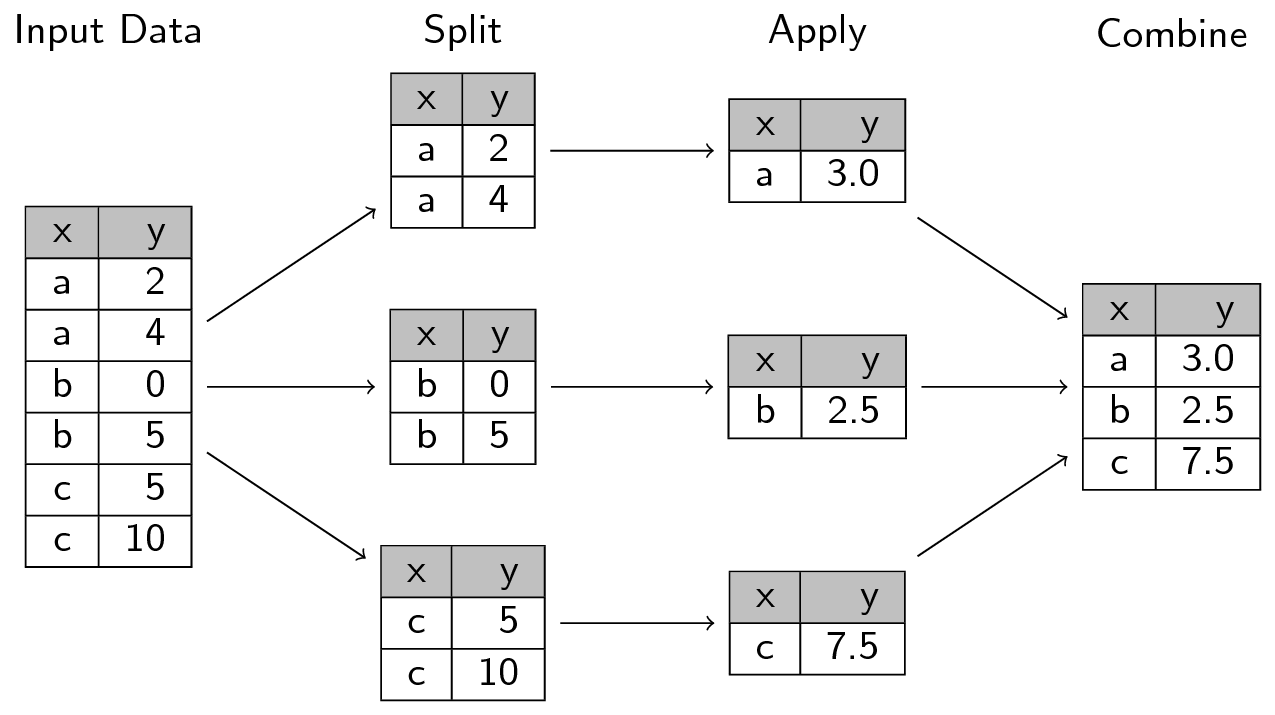
In this post we'll dive into how Dask computes groupby aggregations. These are commonly used operations for ETL and analysis in which we split data into groups, apply a function to each group independently, and then combine the results back together. In the PyData/R world this is often referred to as the split-apply-combine strategy (first coined by [Hadley Wickham](https://www.jstatsoft.org/article/view/v040i01)) and is used widely throughout the [Pandas ecosystem](https://pandas.pydata.org/pandas-docs/stable/user_guide/groupby.html).

<div align="center">
  <a href="/images/split-apply-combine.png">
    <img src="/images/split-apply-combine.png" width="80%" align="center">
  </a>
  <p align="center"><i>Image courtesy of swcarpentry.github.io</i></p>
</div>

Dask leverages this idea using a similarly catchy name: apply-concat-apply or `aca` for short. Here we'll explore the `aca` strategy in both simple and complex operations.

First, recall that a Dask DataFrame is a [collection](https://docs.dask.org/en/latest/dataframe-design.html#internal-design) of DataFrame objects (e.g. each [partition](https://docs.dask.org/en/latest/dataframe-design.html#partitions) of a Dask DataFrame is a Pandas DataFrame). For example, let's say we have the following Pandas DataFrame:

```python
>>> import pandas as pd
>>> df = pd.DataFrame(dict(a=[1, 1, 2, 3, 3, 1, 1, 2, 3, 3, 99, 10, 1],
...                        b=[1, 3, 10, 3, 2, 1, 3, 10, 3, 3, 12, 0, 9],
...                        c=[2, 4, 5, 2, 3, 5, 2, 3, 9, 2, 44, 33, 2]))
>>> df
     a   b   c
0    1   1   2
1    1   3   4
2    2  10   5
3    3   3   2
4    3   2   3
5    1   1   5
6    1   3   2
7    2  10   3
8    3   3   9
9    3   3   2
10  99  12  44
11  10   0  33
12   1   9   2
```

To create a Dask DataFrame with three partitions from this data, we could partition `df` between the indices of: (0, 4), (5, 9), and (10, 12). We can perform this partitioning with Dask by using the `from_pandas` function with `npartitions=3`:

```python
>>> import dask.dataframe as dd
>>> ddf = dd.from_pandas(df, npartitions=3)
```

The 3 partitions are simply 3 individual Pandas DataFrames:

```python
>>> ddf.partitions[0].compute()
   a   b  c
0  1   1  2
1  1   3  4
2  2  10  5
3  3   3  2
4  3   2  3
```

## Apply-concat-apply

When Dask applies a function and/or algorithm (e.g. `sum`, `mean`, etc.) to a Dask DataFrame, it does so by applying that operation to all the constituent partitions independently, collecting (or concatenating) the outputs into intermediary results, and then applying the operation again to the intermediary results to produce a final result. Internally, Dask re-uses the same apply-concat-apply methodology for many of its internal DataFrame calculations.

Let's break down how Dask computes `ddf.groupby(['a', 'b']).c.sum()` by going through each step in the `aca` process. We'll begin by splitting our `df` Pandas DataFrame into three partitions:

```python
>>> df_1 = df[:5]
>>> df_2 = df[5:10]
>>> df_3 = df[-3:]
```

### Apply

Next we perform the same `groupby(['a', 'b']).c.sum()` operation on each of our three partitions:

```python
>>> sr1 = df_1.groupby(['a', 'b']).c.sum()
>>> sr2 = df_2.groupby(['a', 'b']).c.sum()
>>> sr3 = df_3.groupby(['a', 'b']).c.sum()
```

These operations each produce a Series with a [MultiIndex](https://pandas.pydata.org/pandas-docs/stable/user_guide/advanced.html):

<table>
  <tr>
    <th>
      <pre>
>>> sr1
a  b
1  1     2
   3     4
2  10    5
3  2     3
   3     2
Name: c, dtype: int64
      </pre>
    </th>
    <th>
      <pre>
>>> sr2
a  b
1  1      5
   3      2
2  10     3
3  3     11
Name: c, dtype: int64
      </pre>
    </th>
    <th>
      <pre>
>>> sr3
a   b
1   9      2
10  0     33
99  12    44
Name: c, dtype: int64
      </pre>
    </th>
  </tr>
</table>

### The conCat!

After the first `apply`, the next step is to concatenate the intermediate `sr1`, `sr2`, and `sr3` results. This is fairly straightforward to do using the Pandas `concat` function:

```python
>>> sr_concat = pd.concat([sr1, sr2, sr3])
>>> sr_concat
a   b
1   1      2
    3      4
2   10     5
3   2      3
    3      2
1   1      5
    3      2
2   10     3
3   3     11
1   9      2
10  0     33
99  12    44
Name: c, dtype: int64
```

### Apply Redux

Our final step is to apply the same `groupby(['a', 'b']).c.sum()` operation again on the concatenated `sr_concat` Series. However we no longer have columns `a` and `b`, so how should we proceed?

Zooming out a bit, our goal is to add the values in the column which have the same index. For example, there are two rows with the index `(1, 1)` with corresponding values: 2, 5. So how can we groupby the indices with the same value? A MutliIndex uses [levels](https://pandas.pydata.org/pandas-docs/stable/reference/api/pandas.MultiIndex.html#pandas.MultiIndex) to define what the value is at a give index. Dask [determines](https://github.com/dask/dask/blob/973c6e1b2e38c2d9d6e8c75fb9b4ab7a0d07e6a7/dask/dataframe/groupby.py#L69-L75) and [uses these levels](https://github.com/dask/dask/blob/973c6e1b2e38c2d9d6e8c75fb9b4ab7a0d07e6a7/dask/dataframe/groupby.py#L1065) in the final apply step of the apply-concat-apply calculation. In our case, the level is `[0, 1]`, that is, we want both the index at the 0th level and the 1st level and if we group by both, `0, 1`, we will have effectively grouped the same indices together:

```python
>>> total = sr_concat.groupby(level=[0, 1]).sum()
```

<table>
  <tr>
    <th>
      <pre>
>>> total
a   b
1   1      7
    3      6
    9      2
2   10     8
3   2      3
    3     13
10  0     33
99  12    44
Name: c, dtype: int64
      </pre>
    </th>
    <th>
      <pre>
>>> ddf.groupby(['a', 'b']).c.sum().compute()
a   b
1   1      7
    3      6
2   10     8
3   2      3
    3     13
1   9      2
10  0     33
99  12    44
Name: c, dtype: int64
      </pre>
    </th>
    <th>
      <pre>
>>> df.groupby(['a', 'b']).c.sum()
a   b
1   1      7
    3      6
    9      2
2   10     8
3   2      3
    3     13
10  0     33
99  12    44
Name: c, dtype: int64
      </pre>
    </th>
  </tr>
</table>

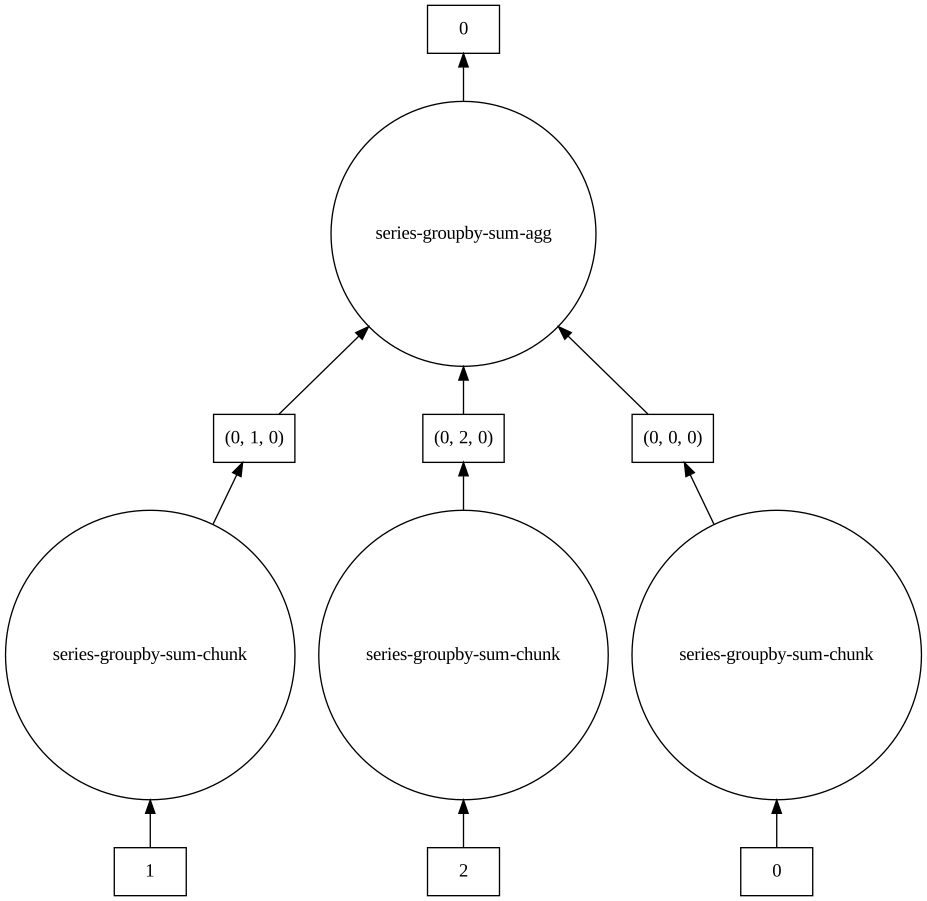
Additionally, we can easily examine the steps of this apply-concat-apply calculation by [visualizing the task graph](https://docs.dask.org/en/latest/graphviz.html) for the computation:

```python
>>> ddf.groupby(['a', 'b']).c.sum().visualize()
```

<a href="/images/sum.svg">
  <img src="/images/sum.svg" width="80%">
</a>

`sum` is rather a straight-forward calculation. What about something a bit more complex like `mean`?

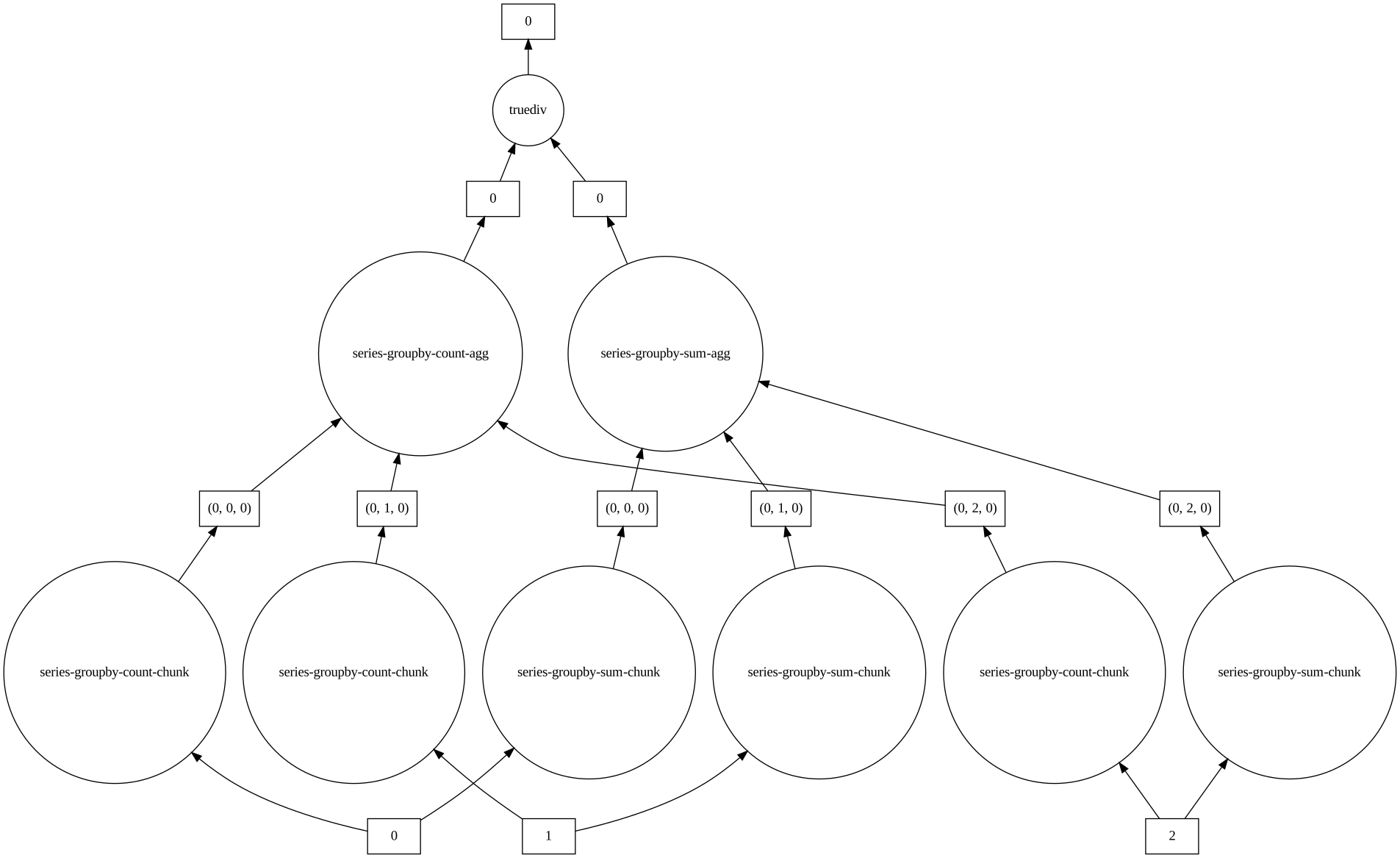
```python
>>> ddf.groupby(['a', 'b']).c.mean().visualize()
```
<a href="/images/mean.svg">
  <img src="/images/mean.svg" width="80%">
</a>

`Mean` is a good example of an operation which doesn't directly fit in the `aca` model -- concatenating `mean` values and taking the `mean` again will yield incorrect results. Like any style of computation: vectorization, Map/Reduce, etc., we sometime need to creatively fit the computation to the style/mode. In the case of `aca` we can often break down the calculation into constituent parts. For `mean`, this would be `sum` and `count`:

$$ \bar{x} = \frac{x_1+x_2+\cdots +x_n}{n}$$

From the task graph above, we can see that two independent tasks for each partition: `series-groupby-count-chunk` and `series-groupby-sum-chunk`. The results are then aggregated into two final nodes: `series-groupby-count-agg` and `series-groupby-sum-agg` and then we finally calculate the mean: `total sum / total count`.