---
blogpost: true
date: Mar 18, 2019
title: Dask and the __array_function__ protocol
author: Peter Andreas Entschev
tags: Dask, Dask-GLM, CuPy, Sparse
description: Advances on NEP-18
---
## Summary
Dask is versatile for analytics parallelism, but there is still one issue to
leverage it to a broader spectrum: allowing it to transparently work with
[NumPy](https://www.numpy.org/)-like libraries. We have previously discussed
how to work with
[GPU Dask Arrays](http://blog.dask.org/2019/01/03/dask-array-gpus-first-steps),
but limited to the scope of the array's member methods sharing a NumPy-like
interface, for example the `.sum()` method, thus, calling general functionality
from NumPy's library wasn't still possible. NumPy recently addressed this issue
in [NEP-18](https://www.numpy.org/neps/nep-0018-array-function-protocol.html)
with the introduction of the `__array_function__` protocol. In short, the
protocol allows a NumPy function call to dispatch the appropriate NumPy-like
library implementation, depending on the array type given as input, thus
allowing Dask to remain agnostic of such libraries, internally calling just the
NumPy function, which automatically handles dispatching of the appropriate
library implementation, for example,
[CuPy](https://cupy.chainer.org/) or [Sparse](https://sparse.pydata.org/).
To understand what's the end goal of this change, consider the following
example:
```python
import numpy as np
import dask.array as da
x = np.random.random((5000, 1000))
d = da.from_array(x, chunks=(1000, 1000))
u, s, v = np.linalg.svd(d)
```
Now consider we want to speedup the SVD computation of a Dask array and offload
that work to a CUDA-capable GPU, we ultimately want to simply replace the NumPy
array `x` by a CuPy array and let NumPy do its magic via
`__array_function__` protocol and dispatch the appropriate CuPy linear algebra
operations under the hood:
```python
import numpy as np
import cupy
import dask.array as da
x = cupy.random.random((5000, 1000))
d = da.from_array(x, chunks=(1000, 1000))
u, s, v = np.linalg.svd(d)
```
We could do the same for a Sparse array, or any other NumPy-like array that
supports the `__array_function__` protocol and the computation that we are
trying to perform. In the next section, we will take a look at potential
performance benefits that the protocol helps leveraging.
Note that the features described in this post are still experimental, some
still under development and review. For a more detailed discussion on the
actual progress of `__array_function__`, please refer to the [Issues section](#issues).
## Performance
Before going any further, assume the following hardware is utilized for all
performance results described in this entire post:
- CPU: 6-core (12-threads) Intel Core i7-7800X @ 3.50GHz
- Main memory: 16 GB
- GPU: NVIDIA Quadro GV100
- OpenBLAS 0.2.18
- cuBLAS 9.2.174
- cuSOLVER 9.2.148
Let's now check an example to see potential performance benefits of the
`__array_function__` protocol with Dask when using CuPy as a backend. Let's
start by creating all the arrays that we will use for computing an SVD later.
Please note that my focus here is how Dask can leverage compute performance,
therefore I'm ignoring in this example the time spent on creating or copying
the arrays between CPU and GPU.
```python
import numpy as np
import cupy
import dask.array as da
x = np.random.random((10000, 1000))
y = cupy.array(x)
dx = da.from_array(x, chunks=(5000, 1000))
dy = da.from_array(y, chunks=(5000, 1000), asarray=False)
```
Seen above we have four arrays:
- `x`: a NumPy array in main memory;
- `y`: a CuPy array in GPU memory;
- `dx`: a NumPy array wrapped in a Dask array;
- `dy`: a _copy_ of a CuPy array wrapped in a Dask array; wrapping a CuPy
array in a Dask array as a view (`asarray=True`) is not supported yet.
### Compute SVD on a NumPy array
We can then start by computing the SVD of `x` using NumPy, thus, it's
processed on CPU in a single thread:
```python
u, s, v = np.linalg.svd(x)
```
The timing information I obtained after that looks like the following:
```
CPU times: user 3min 10s, sys: 347 ms, total: 3min 11s
Wall time: 3min 11s
```
Over 3 minutes seems a bit too slow, so now the question is: Can we do better,
and more importantly, without having to change our entire code?
The answer to this question is: Yes, we can.
Let's look now at other results.
### Compute SVD on the NumPy array wrapped in Dask array
First, of all, this is what you had to do _before_ the introduction of the
`__array_function__` protocol:
```python
u, s, v = da.linalg.svd(dx)
u, s, v = dask.compute(u, s, v)
```
The code above might have been very prohibitive for several projects, since one
needs to call the proper library dispatcher in addition to passing the correct
array. In other words, one would need to find all NumPy calls in the code and
replace those by the correct library's function call, depending on the input
array type. After `__array_function__`, the same NumPy function can be
called, using the Dask array `dx` as input:
```python
u, s, v = np.linalg.svd(dx)
u, s, v = dask.compute(u, s, v)
```
Note: Dask defers computation of results until its consumption, therefore we
need to call the `dask.compute()` function on result arrays to actually compute
them.
Let's now take a look at the timing information:
```
CPU times: user 1min 23s, sys: 460 ms, total: 1min 23s
Wall time: 1min 13s
```
Now, without changing any code, besides the wrapping of the NumPy array as a
Dask array, we can see a speedup of 2x. Not too bad. But let's go back to our
previous question: Can we do better?
### Compute SVD on the CuPy array
We can do the same as for the Dask array now and simply call NumPy's SVD
function on the CuPy array `y`:
```python
u, s, v = np.linalg.svd(y)
```
The timing information we get now is the following:
```
CPU times: user 17.3 s, sys: 1.81 s, total: 19.1 s
Wall time: 19.1 s
```
We now see a 4-5x speedup with no change in internal calls whatsoever! This is
exactly the sort of benefit that we expect to leverage with the
`__array_function__` protocol, speeding up existing code, for free!
Let's go back to our original question one last time: Can we do better?
### Compute SVD on the CuPy array wrapped in Dask array
We can now take advantage of the benefits of Dask data chunk splitting _and_
the CuPy GPU implementation, in an attempt to keep our GPU busy as much as
possible, this remains as simple as:
```python
u, s, v = np.linalg.svd(dy)
u, s, v = dask.compute(u, s, v)
```
For which we get the following timing:
```
CPU times: user 8.97 s, sys: 653 ms, total: 9.62 s
Wall time: 9.45 s
```
Giving us another 2x speedup over the single-threaded CuPy SVD computing.
To conclude, we started from over 3 minutes and are now down to under 10
seconds by simply dispatching the work on a different array.
## Application
We will now talk a bit about potential applications of the
`__array_function__` protocol. For this, we will discuss the
[Dask-GLM](https://dask-glm.readthedocs.io/) library, used for fitting
Generalized Linear Models on large datasets. It's built on top of Dask and
offers an API compatible with [scikit-learn](https://scikit-learn.org/).
Before the introduction of the `__array_function__` protocol, we would need
to rewrite most of its internal implementation for each and every NumPy-like
library that we wished to use as a backend, therefore, we would need a
specialization of the implementation for Dask, another for CuPy and yet
another for Sparse. Now, thanks to all the functionality that these libraries
share through compatible interface, we don't have to change the implementation
at all, we simply pass a different array type as input, as simple as that.
### Example with scikit-learn
To demonstrate the ability we acquired, let's consider the following
scikit-learn example (based on the original example
[here](https://scikit-learn.org/stable/auto_examples/linear_model/plot_ols.html#sphx-glr-auto-examples-linear-model-plot-ols-py)):
```python
import numpy as np
import matplotlib.pyplot as plt
from sklearn.linear_model import LinearRegression
N = 1000
# x from 0 to N
x = N * np.random.random((40000, 1))
# y = a*x + b with noise
y = 0.5 * x + 1.0 + np.random.normal(size=x.shape)
# create a linear regression model
est = LinearRegression()
```
We can then fit the model,
```python
est.fit(x, y)
```
and obtain its time measurements:
```
CPU times: user 3.4 ms, sys: 0 ns, total: 3.4 ms
Wall time: 2.3 ms
```
We can then use it for prediction on some test data,
```python
# predict y from the data
x_new = np.linspace(0, N, 100)
y_new = est.predict(x_new[:, np.newaxis])
```
And also check its time measurements:
```python
CPU times: user 1.16 ms, sys: 680 µs, total: 1.84 ms
Wall time: 1.58 ms
```
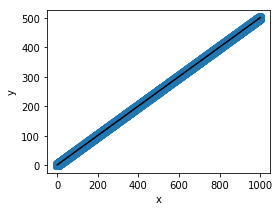
And finally plot the results:
```python
# plot the results
plt.figure(figsize=(4, 3))
ax = plt.axes()
ax.scatter(x, y, linewidth=3)
ax.plot(x_new, y_new, color='black')
ax.set_facecolor((1.0, 1.0, 0.42))
ax.set_xlabel('x')
ax.set_ylabel('y')
ax.axis('tight')
plt.show()
```
 ### Example with Dask-GLM
The only thing we have to change from the code before is the first block, where
we import libraries and create arrays:
```python
import numpy as np
from dask_glm.estimators import LinearRegression
import matplotlib.pyplot as plt
N = 1000
# x from 0 to N
x = N * np.random.random((40000, 1))
# y = a*x + b with noise
y = 0.5 * x + 1.0 + np.random.normal(size=x.shape)
# create a linear regression model
est = LinearRegression(solver='lbfgs')
```
The rest of the code and also the plot look alike the previous scikit-learn
example, so we're ommitting those here for brevity. Note also that we could
have called `LinearRegression()` without any arguments, but for this example
we chose the
[`lbfgs`](https://docs.scipy.org/doc/scipy/reference/optimize.minimize-lbfgsb.html)
solver, that converges reasonably fast.
We can also have a look at the timing results for fitting, followed by those
for predicting with Dask-GLM:
```
# Fitting
CPU times: user 9.66 ms, sys: 116 µs, total: 9.78 ms
Wall time: 8.94 ms
# Predicting
CPU times: user 130 µs, sys: 327 µs, total: 457 µs
Wall time: 1.06 ms
```
If instead we want to use CuPy to compute, we have to change only 3 lines,
importing `cupy` instead of `numpy`, and the two lines where we create the
random arrays, replacing them to `cupy.random` insted of `np.random`. The
block should then look like this:
```python
import cupy
from dask_glm.estimators import LinearRegression
import matplotlib.pyplot as plt
N = 1000
# x from 0 to N
x = N * cupy.random.random((40000, 1))
# y = a*x + b with noise
y = 0.5 * x + 1.0 + cupy.random.normal(size=x.shape)
# create a linear regression model
est = LinearRegression(solver='lbfgs')
```
And the timing results we obtain in this scenario are:
```
# Fitting
CPU times: user 151 ms, sys: 40.7 ms, total: 191 ms
Wall time: 190 ms
# Predicting
CPU times: user 1.91 ms, sys: 778 µs, total: 2.69 ms
Wall time: 1.37 ms
```
For the simple example chosen for this post, scikit-learn outperforms Dask-GLM
using both NumPy and CuPy arrays. There may exist several reasons that
contribute to this, and while we didn't dive deep into understanding the exact
reasons and their extent, we could cite some likely possibilities:
- scikit-learn may be using solvers that converge faster;
- Dask-GLM is entirely built on top of Dask, while scikit-learn may be
heavily optimized internally;
- Too many synchronization steps and data transfer could occur for small
datasets with CuPy.
### Performance for different Dask-GLM solvers
To verify how Dask-GLM with NumPy arrays would compare with CuPy arrays, we
also did some logistic regression benchmarking of Dask-GLM solvers. The results
below were obtained from a training dataset with 102,
103, ..., 106 features of 100 dimensions, and matching
number of test features.
Note: we are intentionally omitting results for Dask arrays, as we have
identified a [potential bug](https://github.com/dask/dask-glm/issues/78) that
causes Dask arrays not to converge.
### Example with Dask-GLM
The only thing we have to change from the code before is the first block, where
we import libraries and create arrays:
```python
import numpy as np
from dask_glm.estimators import LinearRegression
import matplotlib.pyplot as plt
N = 1000
# x from 0 to N
x = N * np.random.random((40000, 1))
# y = a*x + b with noise
y = 0.5 * x + 1.0 + np.random.normal(size=x.shape)
# create a linear regression model
est = LinearRegression(solver='lbfgs')
```
The rest of the code and also the plot look alike the previous scikit-learn
example, so we're ommitting those here for brevity. Note also that we could
have called `LinearRegression()` without any arguments, but for this example
we chose the
[`lbfgs`](https://docs.scipy.org/doc/scipy/reference/optimize.minimize-lbfgsb.html)
solver, that converges reasonably fast.
We can also have a look at the timing results for fitting, followed by those
for predicting with Dask-GLM:
```
# Fitting
CPU times: user 9.66 ms, sys: 116 µs, total: 9.78 ms
Wall time: 8.94 ms
# Predicting
CPU times: user 130 µs, sys: 327 µs, total: 457 µs
Wall time: 1.06 ms
```
If instead we want to use CuPy to compute, we have to change only 3 lines,
importing `cupy` instead of `numpy`, and the two lines where we create the
random arrays, replacing them to `cupy.random` insted of `np.random`. The
block should then look like this:
```python
import cupy
from dask_glm.estimators import LinearRegression
import matplotlib.pyplot as plt
N = 1000
# x from 0 to N
x = N * cupy.random.random((40000, 1))
# y = a*x + b with noise
y = 0.5 * x + 1.0 + cupy.random.normal(size=x.shape)
# create a linear regression model
est = LinearRegression(solver='lbfgs')
```
And the timing results we obtain in this scenario are:
```
# Fitting
CPU times: user 151 ms, sys: 40.7 ms, total: 191 ms
Wall time: 190 ms
# Predicting
CPU times: user 1.91 ms, sys: 778 µs, total: 2.69 ms
Wall time: 1.37 ms
```
For the simple example chosen for this post, scikit-learn outperforms Dask-GLM
using both NumPy and CuPy arrays. There may exist several reasons that
contribute to this, and while we didn't dive deep into understanding the exact
reasons and their extent, we could cite some likely possibilities:
- scikit-learn may be using solvers that converge faster;
- Dask-GLM is entirely built on top of Dask, while scikit-learn may be
heavily optimized internally;
- Too many synchronization steps and data transfer could occur for small
datasets with CuPy.
### Performance for different Dask-GLM solvers
To verify how Dask-GLM with NumPy arrays would compare with CuPy arrays, we
also did some logistic regression benchmarking of Dask-GLM solvers. The results
below were obtained from a training dataset with 102,
103, ..., 106 features of 100 dimensions, and matching
number of test features.
Note: we are intentionally omitting results for Dask arrays, as we have
identified a [potential bug](https://github.com/dask/dask-glm/issues/78) that
causes Dask arrays not to converge.
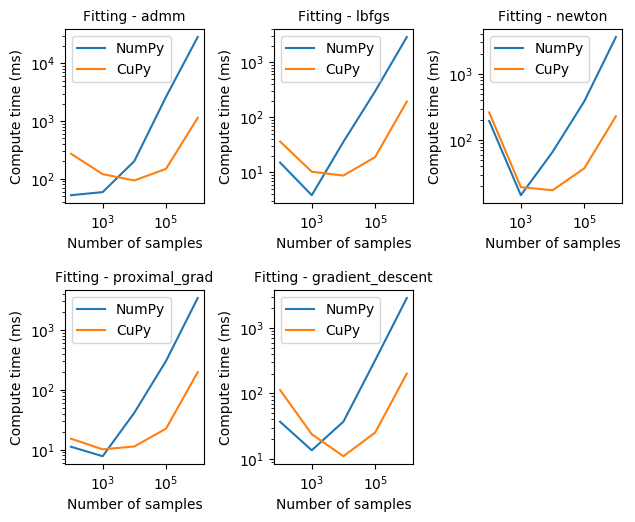 From the results observed in the graphs above we can see that CuPy can be one
order of magnitude faster than NumPy for fitting with any of the Dask-GLM
solvers. Please note also that both axis are given in logarithmic scale for
easier visualization.
Another interesting effect that can be seen is how converging may take longer
for small number of samples. However, as we would normally hope for, compute
time required to converge scales linearly to the number of samples.
From the results observed in the graphs above we can see that CuPy can be one
order of magnitude faster than NumPy for fitting with any of the Dask-GLM
solvers. Please note also that both axis are given in logarithmic scale for
easier visualization.
Another interesting effect that can be seen is how converging may take longer
for small number of samples. However, as we would normally hope for, compute
time required to converge scales linearly to the number of samples.
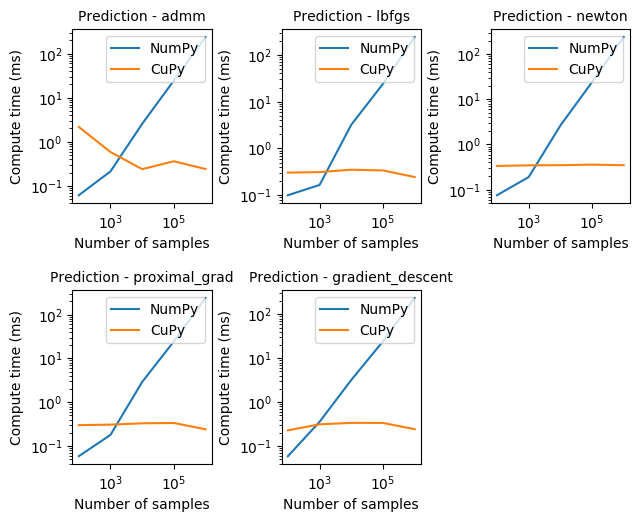 Prediction with CuPy, as seen above, can be proportionally much faster than
NumPy, staying mostly constant for all solvers, and around 3-4 orders of
magnitude faster.
## Issues
In this section we describe the work that has been done and is still ongoing
since February, 2019, towards enabling the features described in previous
sections. If you are not interested in all the details, feel free to completely
skip this.
### Fixed Issues
Since early February, 2019, substantial progress has been made towards deeper
support of the `__array_function__` protocol in the different projects,
this trend is still going on and will continue in March. Below we see a list
of issues that have been fixed or are in the process of review:
- `__array_function__` protocol dependencies fixed in
[CuPy PR #2029](https://github.com/cupy/cupy/issues/2029);
- Dask issues using CuPy backend with mean() and moment()
[Dask Issue #4481](https://github.com/dask/dask/issues/4481), fixed in
[Dask PR #4513](https://github.com/dask/dask/pull/4513) and
[Dask PR #4519](https://github.com/dask/dask/pull/4519);
- Replace in SciPy the aliased NumPy functions that may not be available in
libraries like CuPy, fixed in
[SciPy PR #9888](https://github.com/scipy/scipy/pull/9888);
- Allow creation of arbitrary shaped arrays, using the input array as
reference for the new array to be created, under review in
[NumPy PR #13043](https://github.com/numpy/numpy/issues/13043);
- Multithreading with CuPy first identified in
[Dask Issue #4487](https://github.com/dask/dask/issues/4487),
[CuPy Issue #2045](https://github.com/cupy/cupy/issues/2045) and
[CuPy Issue #1109](https://github.com/cupy/cupy/issues/1109), now under
review in [CuPy PR #2053](https://github.com/cupy/cupy/pull/2053);
- Calling Dask's `flatnonzero()` on CuPy array missing `cupy.compress()`,
first identified in
[Dask Issue #4497](https://github.com/dask/dask/issues/4497), under review
in [Dask PR #4548](https://github.com/dask/dask/pull/4548),
- Dask support for `__array_function__`, under review in
[Dask PR #4567](https://github.com/dask/dask/pull/4567).
### Known Issues
Currently, one of the biggest issues we are tackling relates to the
[Dask issue #4490](https://github.com/dask/dask/issues/4490) we first
identified when calling Dask's `diag()` on a CuPy array. This requires some
change on the Dask `Array` class, and subsequent changes throughout large
parts of the Dask codebase. I will not go into too much detail here, but the
way we are handling this issue is by adding a new attribute `_meta` to Dask
`Array` in replacement of the simple `dtype` that currently exists. This
new attribute will not only hold the `dtype` information, but also an empty
array of the backend type used to create the `Array` in the first place, thus
allowing us to internally reconstruct arrays of the backend type, without
having to know explicitly whether it's a NumPy, CuPy, Sparse or any other
NumPy-like array. For additional details, please refer to [Dask Issue
#2977](https://github.com/dask/dask/issues/2977).
We have identified some more issues with ongoing discussions:
- Using Sparse as a Dask backend, discussed in
[Dask Issue #4523](https://github.com/dask/dask/issues/4523);
- Calling Dask's `fix()` on CuPy array depends on `__array_wrap__`,
discussed in [Dask Issue #4496](https://github.com/dask/dask/issues/4496)
and [CuPy Issue #589](https://github.com/cupy/cupy/issues/589);
- Allow coercing of `__array_function__`, discussed in
[NumPy Issue #12974](https://github.com/numpy/numpy/issues/12974).
## Future Work
There are several possibilities for a richer experience with Dask, some of which
could be very interesting in the short and mid-term are:
1. Use [Dask-cuDF](https://github.com/rapidsai/dask-cudf) alongside with
Dask-GLM to present interesting realistic applications of the whole
ecosystem;
2. More comprehensive examples and benchmarks for Dask-GLM;
3. Support for [more models in
Dask-GLM](https://scikit-learn.org/stable/modules/linear_model.html);
4. A deeper look into the Dask-GLM versus scikit-learn performance;
5. Profile CuPy's performance of matrix-matrix multiplication operations
(GEMM), compare to matrix-vector multiplication operations (GEMV) for
distributed Dask operation.
Prediction with CuPy, as seen above, can be proportionally much faster than
NumPy, staying mostly constant for all solvers, and around 3-4 orders of
magnitude faster.
## Issues
In this section we describe the work that has been done and is still ongoing
since February, 2019, towards enabling the features described in previous
sections. If you are not interested in all the details, feel free to completely
skip this.
### Fixed Issues
Since early February, 2019, substantial progress has been made towards deeper
support of the `__array_function__` protocol in the different projects,
this trend is still going on and will continue in March. Below we see a list
of issues that have been fixed or are in the process of review:
- `__array_function__` protocol dependencies fixed in
[CuPy PR #2029](https://github.com/cupy/cupy/issues/2029);
- Dask issues using CuPy backend with mean() and moment()
[Dask Issue #4481](https://github.com/dask/dask/issues/4481), fixed in
[Dask PR #4513](https://github.com/dask/dask/pull/4513) and
[Dask PR #4519](https://github.com/dask/dask/pull/4519);
- Replace in SciPy the aliased NumPy functions that may not be available in
libraries like CuPy, fixed in
[SciPy PR #9888](https://github.com/scipy/scipy/pull/9888);
- Allow creation of arbitrary shaped arrays, using the input array as
reference for the new array to be created, under review in
[NumPy PR #13043](https://github.com/numpy/numpy/issues/13043);
- Multithreading with CuPy first identified in
[Dask Issue #4487](https://github.com/dask/dask/issues/4487),
[CuPy Issue #2045](https://github.com/cupy/cupy/issues/2045) and
[CuPy Issue #1109](https://github.com/cupy/cupy/issues/1109), now under
review in [CuPy PR #2053](https://github.com/cupy/cupy/pull/2053);
- Calling Dask's `flatnonzero()` on CuPy array missing `cupy.compress()`,
first identified in
[Dask Issue #4497](https://github.com/dask/dask/issues/4497), under review
in [Dask PR #4548](https://github.com/dask/dask/pull/4548),
- Dask support for `__array_function__`, under review in
[Dask PR #4567](https://github.com/dask/dask/pull/4567).
### Known Issues
Currently, one of the biggest issues we are tackling relates to the
[Dask issue #4490](https://github.com/dask/dask/issues/4490) we first
identified when calling Dask's `diag()` on a CuPy array. This requires some
change on the Dask `Array` class, and subsequent changes throughout large
parts of the Dask codebase. I will not go into too much detail here, but the
way we are handling this issue is by adding a new attribute `_meta` to Dask
`Array` in replacement of the simple `dtype` that currently exists. This
new attribute will not only hold the `dtype` information, but also an empty
array of the backend type used to create the `Array` in the first place, thus
allowing us to internally reconstruct arrays of the backend type, without
having to know explicitly whether it's a NumPy, CuPy, Sparse or any other
NumPy-like array. For additional details, please refer to [Dask Issue
#2977](https://github.com/dask/dask/issues/2977).
We have identified some more issues with ongoing discussions:
- Using Sparse as a Dask backend, discussed in
[Dask Issue #4523](https://github.com/dask/dask/issues/4523);
- Calling Dask's `fix()` on CuPy array depends on `__array_wrap__`,
discussed in [Dask Issue #4496](https://github.com/dask/dask/issues/4496)
and [CuPy Issue #589](https://github.com/cupy/cupy/issues/589);
- Allow coercing of `__array_function__`, discussed in
[NumPy Issue #12974](https://github.com/numpy/numpy/issues/12974).
## Future Work
There are several possibilities for a richer experience with Dask, some of which
could be very interesting in the short and mid-term are:
1. Use [Dask-cuDF](https://github.com/rapidsai/dask-cudf) alongside with
Dask-GLM to present interesting realistic applications of the whole
ecosystem;
2. More comprehensive examples and benchmarks for Dask-GLM;
3. Support for [more models in
Dask-GLM](https://scikit-learn.org/stable/modules/linear_model.html);
4. A deeper look into the Dask-GLM versus scikit-learn performance;
5. Profile CuPy's performance of matrix-matrix multiplication operations
(GEMM), compare to matrix-vector multiplication operations (GEMV) for
distributed Dask operation.