---
blogpost: true
date: Jan 13, 2019
title: "Dask, Pandas, and GPUs: first steps"
author: Matthew Rocklin
tags: GPU, Pandas
---
## Executive Summary
We're building a distributed GPU Pandas dataframe out of
[cuDF](https://github.com/rapidsai/cudf) and
[Dask Dataframe](https://docs.dask.org/en/latest/dataframe.html).
This effort is young.
This post describes the current situation,
our general approach,
and gives examples of what does and doesn't work today.
We end with some notes on scaling performance.
You can also view the experiment in this post as
[a notebook](https://gist.github.com/mrocklin/4b1b80d1ae07ec73f75b2a19c8e90e2e).
And here is a table of results:
| Architecture |
Time |
Bandwidth |
| Single CPU Core |
3min 14s |
50 MB/s |
| Eight CPU Cores |
58s |
170 MB/s |
| Forty CPU Cores |
35s |
285 MB/s |
| One GPU |
11s |
900 MB/s |
| Eight GPUs |
5s |
2000 MB/s |
## Building Blocks: cuDF and Dask
Building a distributed GPU-backed dataframe is a large endeavor.
Fortunately we're starting on a good foundation and
can assemble much of this system from existing components:
1. The [cuDF](https://github.com/rapidsai/cudf) library aims to implement the
Pandas API on the GPU. It gets good speedups on standard operations like
reading CSV files, filtering and aggregating columns, joins, and so on.
```python
import cudf # looks and feels like Pandas, but runs on the GPU
df = cudf.read_csv('myfile.csv')
df = df[df.name == 'Alice']
df.groupby('id').value.mean()
```
cuDF is part of the growing [RAPIDS initiative](https://rapids.ai).
2. The [Dask Dataframe](https://docs.dask.org/en/latest/dataframe.html)
library provides parallel algorithms around the Pandas API. It composes
large operations like distributed groupbys or distributed joins from a task
graph of many smaller single-node groupbys or joins accordingly (and many
[other operations](https://docs.dask.org/en/latest/dataframe-api.html)).
```python
import dask.dataframe as dd # looks and feels like Pandas, but runs in parallel
df = dd.read_csv('myfile.*.csv')
df = df[df.name == 'Alice']
df.groupby('id').value.mean().compute()
```
3. The [Dask distributed task scheduler](https://distributed.dask.org)
provides general-purpose parallel execution given complex task graphs.
It's good for adding multi-node computing into an existing codebase.
Given these building blocks,
our approach is to make the cuDF API close enough to Pandas that
we can reuse the Dask Dataframe algorithms.
## Benefits and Challenges to this approach
This approach has a few benefits:
1. We get to reuse the parallel algorithms found in Dask Dataframe originally designed for Pandas.
2. It consolidates the development effort within a single codebase so that
future effort spent on CPU Dataframes benefits GPU Dataframes and vice
versa. Maintenance costs are shared.
3. By building code that works equally with two DataFrame implementations
(CPU and GPU) we establish conventions and protocols that will
make it easier for other projects to do the same, either with these two
Pandas-like libraries, or with future Pandas-like libraries.
This approach also aims to demonstrate that the ecosystem should support Pandas-like
libraries, rather than just Pandas. For example, if
(when?) the Arrow library develops a computational system then we'll be in
a better place to roll that in as well.
4. When doing any refactor we tend to clean up existing code.
For example, to make dask dataframe ready for a new GPU Parquet reader
we end up [refactoring and simplifying our Parquet I/O logic](https://github.com/dask/dask/pull/4336).
The approach also has some drawbacks. Namely, it places API pressure on cuDF to match Pandas so:
1. Slight differences in API now cause larger problems, such as these:
- [Join column ordering differs rapidsai/cudf #251](https://github.com/rapidsai/cudf/issues/251)
- [Groupby aggregation column ordering differs rapidsai/cudf #483](https://github.com/rapidsai/cudf/issues/483#issuecomment-453218151)
2. cuDF has some pressure on it to repeat what some believe to be mistakes in
the Pandas API.
For example, cuDF today supports missing values arguably more sensibly than
Pandas. Should cuDF have to revert to the old way of doing things
just to match Pandas semantics? Dask Dataframe will probably need
to be more flexible in order to handle evolution and small differences
in semantics.
## Alternatives
We could also write a new dask-dataframe-style project around cuDF that deviates
from the Pandas/Dask Dataframe API. Until recently this
has actually been the approach, and the
[dask-cudf](https://github.com/rapidsai/dask-cudf) project did exactly this.
This was probably a good choice early on to get started and prototype things.
The project was able to implement a wide range of functionality including
groupby-aggregations, joins, and so on using
[dask delayed](https://docs.dask.org/en/latest/delayed.html).
We're redoing this now on top of dask dataframe though, which means that we're
losing some functionality that dask-cudf already had, but hopefully the
functionality that we add now will be more stable and established on a firmer
base.
## Status Today
Today very little works, but what does is decently smooth.
Here is a simple example that reads some data from many CSV files,
picks out a column,
and does some aggregations.
```python
from dask_cuda import LocalCUDACluster
import dask_cudf
from dask.distributed import Client
cluster = LocalCUDACluster() # runs on eight local GPUs
client = Client(cluster)
gdf = dask_cudf.read_csv('data/nyc/many/*.csv') # wrap around many CSV files
>>> gdf.passenger_count.sum().compute()
184464740
```
_Also note, NYC Taxi ridership is significantly less than it was a few years ago_
## What I'm excited about in the example above
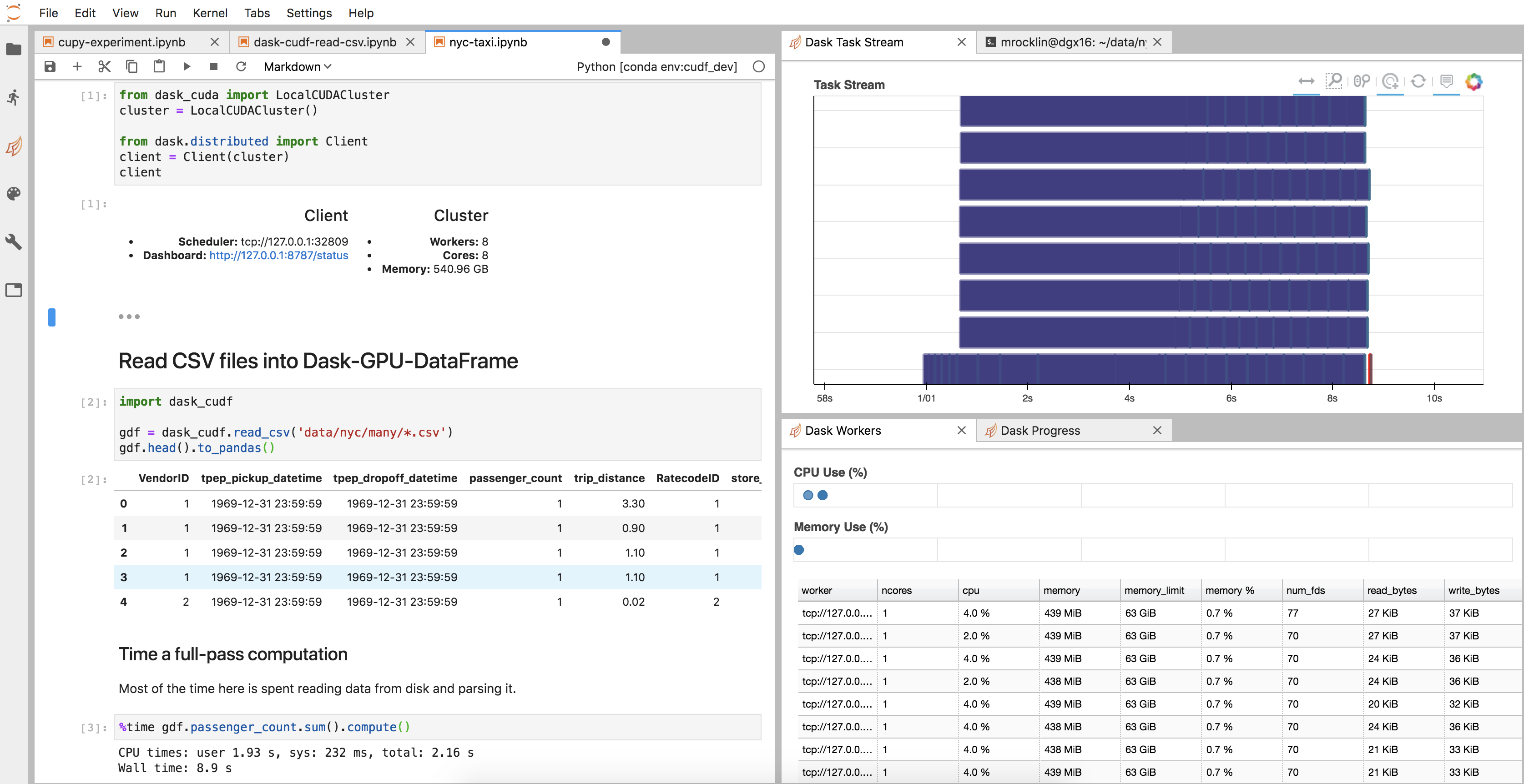
- All of the infrastructure surrounding the cuDF code, like the cluster setup,
diagnostics, JupyterLab environment, and so on, came for free, like any
other new Dask project.
Here is an image of my JupyterLab setup
 - Our `df` object is actually just a normal Dask Dataframe. We didn't have to
write new `__repr__`, `__add__`, or `.sum()` implementations, and probably
many functions we didn't think about work well today (though also many
don't).
- We're tightly integrated and more connected to other systems. For example, if
we wanted to convert our dask-cudf-dataframe to a dask-pandas-dataframe then
we would just use the cuDF `to_pandas` function:
```python
df = df.map_partitions(cudf.DataFrame.to_pandas)
```
We don't have to write anything special like a separate `.to_dask_dataframe`
method or handle other special cases.
Dask parallelism is orthogonal to the choice of CPU or GPU.
- It's easy to switch hardware. By avoiding separate `dask-cudf` code paths
it's easier to add cuDF to an existing Dask+Pandas codebase to run on GPUs,
or to remove cuDF and use Pandas if we want our code to be runnable without GPUs.
There are more examples of this in the scaling section below.
## What's wrong with the example above
In general the answer is **many small things**.
1. The `cudf.read_csv` function doesn't yet support reading chunks from a
single CSV file, and so doesn't work well with very large CSV files. We
had to split our large CSV files into many smaller CSV files first with
normal Dask+Pandas:
```python
import dask.dataframe as dd
(df = dd.read_csv('few-large/*.csv')
.repartition(npartitions=100)
.to_csv('many-small/*.csv', index=False))
```
(See [rapidsai/cudf #568](https://github.com/rapidsai/cudf/issues/568))
2. Many operations that used to work in dask-cudf like groupby-aggregations
and joins no longer work. We're going to need to slightly modify many cuDF
APIs over the next couple of months to more closely match their Pandas
equivalents.
3. I ran the timing cell twice because it currently takes a few seconds to
`import cudf` today.
[rapidsai/cudf #627](https://github.com/rapidsai/cudf/issues/627)
4. We had to make Dask Dataframe a bit more flexible and assume less about its
constituent dataframes being exactly Pandas dataframes. (see
[dask/dask #4359](https://github.com/dask/dask/pull/4359) and
[dask/dask #4375](https://github.com/dask/dask/pull/4375) for examples).
I suspect that there will by many more small changes like
these necessary in the future.
These problems are representative of dozens more similar issues. They are
all fixable and indeed, many are actively being fixed today by the [good folks
working on RAPIDS](https://github.com/rapidsai/cudf/graphs/contributors).
## Near Term Schedule
The RAPIDS group is currently busy working to release 0.5, which includes some
of the fixes necessary to run the example above, and also many unrelated
stability improvements. This will probably keep them busy for a week or two
during which I don't expect to see much Dask + cuDF work going on other than
planning.
After that, Dask parallelism support will be a top priority, so
I look forward to seeing some rapid progress here.
## Scaling Results
In [my last post about combining Dask Array with CuPy](../../../2019/01/03/dask-array-gpus-first-steps),
a GPU-accelerated Numpy,
we saw impressive speedups from using many GPUs on a simple problem that
manipulated some simple random data.
### Dask Array + CuPy on Random Data
- Our `df` object is actually just a normal Dask Dataframe. We didn't have to
write new `__repr__`, `__add__`, or `.sum()` implementations, and probably
many functions we didn't think about work well today (though also many
don't).
- We're tightly integrated and more connected to other systems. For example, if
we wanted to convert our dask-cudf-dataframe to a dask-pandas-dataframe then
we would just use the cuDF `to_pandas` function:
```python
df = df.map_partitions(cudf.DataFrame.to_pandas)
```
We don't have to write anything special like a separate `.to_dask_dataframe`
method or handle other special cases.
Dask parallelism is orthogonal to the choice of CPU or GPU.
- It's easy to switch hardware. By avoiding separate `dask-cudf` code paths
it's easier to add cuDF to an existing Dask+Pandas codebase to run on GPUs,
or to remove cuDF and use Pandas if we want our code to be runnable without GPUs.
There are more examples of this in the scaling section below.
## What's wrong with the example above
In general the answer is **many small things**.
1. The `cudf.read_csv` function doesn't yet support reading chunks from a
single CSV file, and so doesn't work well with very large CSV files. We
had to split our large CSV files into many smaller CSV files first with
normal Dask+Pandas:
```python
import dask.dataframe as dd
(df = dd.read_csv('few-large/*.csv')
.repartition(npartitions=100)
.to_csv('many-small/*.csv', index=False))
```
(See [rapidsai/cudf #568](https://github.com/rapidsai/cudf/issues/568))
2. Many operations that used to work in dask-cudf like groupby-aggregations
and joins no longer work. We're going to need to slightly modify many cuDF
APIs over the next couple of months to more closely match their Pandas
equivalents.
3. I ran the timing cell twice because it currently takes a few seconds to
`import cudf` today.
[rapidsai/cudf #627](https://github.com/rapidsai/cudf/issues/627)
4. We had to make Dask Dataframe a bit more flexible and assume less about its
constituent dataframes being exactly Pandas dataframes. (see
[dask/dask #4359](https://github.com/dask/dask/pull/4359) and
[dask/dask #4375](https://github.com/dask/dask/pull/4375) for examples).
I suspect that there will by many more small changes like
these necessary in the future.
These problems are representative of dozens more similar issues. They are
all fixable and indeed, many are actively being fixed today by the [good folks
working on RAPIDS](https://github.com/rapidsai/cudf/graphs/contributors).
## Near Term Schedule
The RAPIDS group is currently busy working to release 0.5, which includes some
of the fixes necessary to run the example above, and also many unrelated
stability improvements. This will probably keep them busy for a week or two
during which I don't expect to see much Dask + cuDF work going on other than
planning.
After that, Dask parallelism support will be a top priority, so
I look forward to seeing some rapid progress here.
## Scaling Results
In [my last post about combining Dask Array with CuPy](../../../2019/01/03/dask-array-gpus-first-steps),
a GPU-accelerated Numpy,
we saw impressive speedups from using many GPUs on a simple problem that
manipulated some simple random data.
### Dask Array + CuPy on Random Data
| Architecture |
Time |
| Single CPU Core |
2hr 39min |
| Forty CPU Cores |
11min 30s |
| One GPU |
1 min 37s |
| Eight GPUs |
19s |
That exercise was easy to scale because it was almost entirely bound by the
computation of creating random data.
### Dask DataFrame + cuDF on CSV data
We did a similar study on the `read_csv` example above, which is bound mostly
by reading CSV data from disk and then parsing it. You can see a notebook
available
[here](https://gist.github.com/mrocklin/4b1b80d1ae07ec73f75b2a19c8e90e2e). We
have similar (though less impressive) numbers to present.
| Architecture |
Time |
Bandwidth |
| Single CPU Core |
3min 14s |
50 MB/s |
| Eight CPU Cores |
58s |
170 MB/s |
| Forty CPU Cores |
35s |
285 MB/s |
| One GPU |
11s |
900 MB/s |
| Eight GPUs |
5s |
2000 MB/s |
_The bandwidth numbers were computed by noting that the data was around 10 GB on disk_
## Analysis
First, I want to emphasize again that it's easy to test a wide variety of
architectures using this setup because of the Pandas API compatibility between
all of the different projects. We're seeing a wide range of performance (40x
span) across a variety of different hardware with a wide range of cost points.
Second, note that this problem scales less well than our
[previous example with CuPy](../../../2019/01/03/dask-array-gpus-first-steps),
both on CPU and GPU.
I suspect that this is because this example is also bound by I/O and not just
number-crunching. While the jump from single-CPU to single-GPU is large, the
jump from single-CPU to many-CPU or single-GPU to many-GPU is not as large as
we would have liked. For GPUs for example we got around a 2x speedup when we
added 8x as many GPUs.
At first one might think that this is because we're saturating disk read speeds.
However two pieces of evidence go against that guess:
- NVIDIA folks familiar with my current hardware inform me that they're able to get
much higher I/O throughput when they're careful
- The CPU scaling is similarly poor, despite the fact that it's obviously not
reaching full I/O bandwidth
Instead, it's likely that we're just not treating our disks and IO pipelines
carefully.
We might consider working to think more carefully about data locality within a
single machine. Alternatively, we might just choose to use a smaller machine,
or many smaller machines. My team has been asking me to start playing with
some cheaper systems than a DGX, I may experiment with those soon. It may be
that for data-loading and pre-processing workloads the previous wisdom of "pack
as much computation as you can into a single box" no longer holds
(without us doing more work that is).
### Come help
If the work above sounds interesting to you then come help!
There is a lot of low-hanging and high impact work to do.
If you're interested in being paid to focus more on these topics, then consider
applying for a job. NVIDIA's RAPIDS team is looking to hire engineers for Dask
development with GPUs and other data analytics library development projects.
- [Senior Library Software Engineer - RAPIDS](https://nvidia.wd5.myworkdayjobs.com/en-US/NVIDIAExternalCareerSite/job/US-TX-Austin/Senior-Library-Software-Engineer---RAPIDS_JR1919608-1)