---
blogpost: true
date: Feb 11, 2017
title: Experiment with Dask and TensorFlow
tags: Programming, Python, scipy
---
_This work is supported by [Continuum Analytics](http://continuum.io)
the [XDATA Program](http://www.darpa.mil/program/XDATA)
and the Data Driven Discovery Initiative from the [Moore
Foundation](https://www.moore.org/)_
## Summary
This post briefly describes potential interactions between Dask and TensorFlow
and then goes through a concrete example using them together for distributed
training with a moderately complex architecture.
This post was written in haste and the attached experiment is of low quality,
see disclaimers below. A similar and much better example with XGBoost is
included in the comments at the end.
## Introduction
Dask and TensorFlow both provide distributed computing in Python.
TensorFlow excels at deep learning applications while Dask is more generic.
We can combine both together in a few applications:
1. **Simple data parallelism:** hyper-parameter searches during training
and predicting already-trained models against large datasets are both
trivial to distribute with Dask as they would be trivial to distribute with
any distributed computing system (Hadoop/Spark/Flink/etc..) We won't
discuss this topic much. It should be straightforward.
2. **Deployment:** A common pain point with TensorFlow is that setup isn't
well automated. This plagues all distributed systems, especially those
that are run on a wide variety of cluster managers (see [cluster deployment
blogpost](/2016/09/22/cluster-deployments)
for more information). Fortunately, if you already have a Dask cluster
running it's trivial to stand up a distributed TensorFlow network on
top of it running within the same processes.
3. **Pre-processing:** We pre-process data with dask.dataframe or dask.array,
and then hand that data off to TensorFlow for training. If Dask and
TensorFlow are co-located on the same processes then this movement is
efficient. Working together we can build efficient and general use deep
learning pipelines.
In this blogpost we look _very_ briefly at the first case of simple
parallelism. Then go into more depth on an experiment that uses Dask and
TensorFlow in a more complex situation. We'll find we can accomplish a fairly
sophisticated workflow easily, both due to how sensible TensorFlow is to set up
and how flexible Dask can be in advanced situations.
## Motivation and Disclaimers
Distributed deep learning is fundamentally changing the way humanity solves
some very hard computing problems like natural language translation,
speech-to-text transcription, image recognition, etc.. However, distributed
deep learning also suffers from public excitement, which may distort our image
of its utility. Distributed deep learning is not always the correct choice for
most problems. This is for two reasons:
1. Focusing on **single machine** computation is often a better use of time.
Model design, GPU hardware, etc. can have a more dramatic impact than
scaling out. For newcomers to deep learning, watching [online video lecture
series](https://simons.berkeley.edu/talks/tutorial-deep-learning) may be a
better use of time than reading this blogpost.
2. **Traditional machine learning** techniques like logistic regression, and
gradient boosted trees can be more effective than deep learning if you have
finite data. They can also sometimes provide valuable interpretability
results.
Regardless, there are some concrete take-aways, even if distributed deep
learning is not relevant to your application:
1. TensorFlow is straightforward to set up from Python
2. Dask is sufficiently flexible out of the box to support complex settings
and workflows
3. We'll see an example of a typical distributed learning approach that
generalizes beyond deep learning.
Additionally the author does not claim expertise in deep learning and wrote
this blogpost in haste.
## Simple Parallelism
Most parallel computing is simple. We easily apply one function to lots of
data, perhaps with slight variation. In the case of deep learning this
can enable a couple of common workflows:
1. Build many different models, train each on the same data, choose the best
performing one. Using dask's concurrent.futures interface, this looks
something like the following:
```python
# Hyperparameter search
client = Client('dask-scheduler-address:8786')
scores = client.map(train_and_evaluate, hyper_param_list, data=data)
best = client.submit(max, scores)
best.result()
```
2. Given an already-trained model, use it to predict outcomes on lots of data.
Here we use a big data collection like dask.dataframe:
```python
# Distributed prediction
df = dd.read_parquet('...')
... # do some preprocessing here
df['outcome'] = df.map_partitions(predict)
```
These techniques are relatively straightforward if you have modest exposure to
Dask and TensorFlow (or any other machine learning library like scikit-learn),
so I'm going to ignore them for now and focus on more complex situations.
Interested readers may find this blogpost on
[TensorFlow and Spark](https://databricks.com/blog/2016/01/25/deep-learning-with-apache-spark-and-tensorflow.html)
of interest. It is a nice writeup that goes over these two techniques in more
detail.
## A Distributed TensorFlow Application
We're going to replicate [this TensorFlow example](https://github.com/tensorflow/tensorflow/blob/master/tensorflow/tools/dist_test/python/mnist_replica.py)
which uses multiple machines to train a model that fits in memory using
parameter servers for coordination. Our TensorFlow network will have three
different kinds of servers:
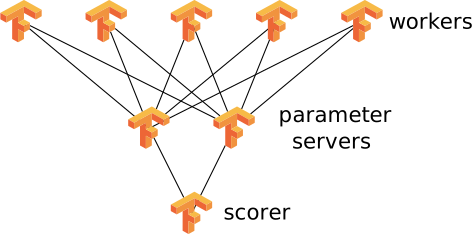 1. **Workers**: which will get updated parameters, consume training data, and
use that data to generate updates to send back to the parameter servers
2. **Parameter Servers:** which will hold onto model parameters, synchronizing
with the workers as necessary
3. **Scorer:** which will periodically test the current parameters against
validation/test data and emit a current cross_entropy score to see how well
the system is running.
This is a fairly typical approach when the model can fit in one machine, but
when we want to use multiple machines to accelerate training or because data
volumes are too large.
We'll use TensorFlow to do all of the actual training and scoring. We'll use
Dask to do everything else. In particular, we're about to do the following:
1. Prepare data with dask.array
2. Set up TensorFlow workers as long-running tasks
3. Feed data from Dask to TensorFlow while scores remain poor
4. Let TensorFlow handle training using its own network
## Prepare Data with Dask.array
For this toy example we're just going to use the mnist data that comes with
TensorFlow. However, we'll artificially inflate this data by concatenating
it to itself many times across a cluster:
```python
def get_mnist():
from tensorflow.examples.tutorials.mnist import input_data
mnist = input_data.read_data_sets('/tmp/mnist-data', one_hot=True)
return mnist.train.images, mnist.train.labels
import dask.array as da
from dask import delayed
datasets = [delayed(get_mnist)() for i in range(20)] # 20 versions of same dataset
images = [d[0] for d in datasets]
labels = [d[1] for d in datasets]
images = [da.from_delayed(im, shape=(55000, 784), dtype='float32') for im in images]
labels = [da.from_delayed(la, shape=(55000, 10), dtype='float32') for la in labels]
images = da.concatenate(images, axis=0)
labels = da.concatenate(labels, axis=0)
>>> images
dask.array
images, labels = c.persist([images, labels]) # persist data in memory
```
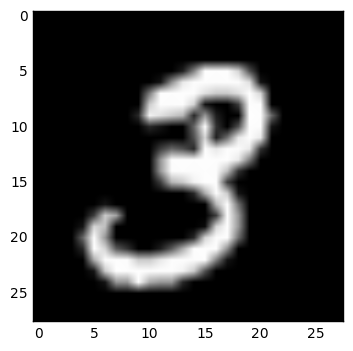
This gives us a moderately large distributed array of around a million tiny
images. If we wanted to we could inspect or clean up this data using normal
dask.array constructs:
```python
im = images[1].compute().reshape((28, 28))
plt.imshow(im, cmap='gray')
```
1. **Workers**: which will get updated parameters, consume training data, and
use that data to generate updates to send back to the parameter servers
2. **Parameter Servers:** which will hold onto model parameters, synchronizing
with the workers as necessary
3. **Scorer:** which will periodically test the current parameters against
validation/test data and emit a current cross_entropy score to see how well
the system is running.
This is a fairly typical approach when the model can fit in one machine, but
when we want to use multiple machines to accelerate training or because data
volumes are too large.
We'll use TensorFlow to do all of the actual training and scoring. We'll use
Dask to do everything else. In particular, we're about to do the following:
1. Prepare data with dask.array
2. Set up TensorFlow workers as long-running tasks
3. Feed data from Dask to TensorFlow while scores remain poor
4. Let TensorFlow handle training using its own network
## Prepare Data with Dask.array
For this toy example we're just going to use the mnist data that comes with
TensorFlow. However, we'll artificially inflate this data by concatenating
it to itself many times across a cluster:
```python
def get_mnist():
from tensorflow.examples.tutorials.mnist import input_data
mnist = input_data.read_data_sets('/tmp/mnist-data', one_hot=True)
return mnist.train.images, mnist.train.labels
import dask.array as da
from dask import delayed
datasets = [delayed(get_mnist)() for i in range(20)] # 20 versions of same dataset
images = [d[0] for d in datasets]
labels = [d[1] for d in datasets]
images = [da.from_delayed(im, shape=(55000, 784), dtype='float32') for im in images]
labels = [da.from_delayed(la, shape=(55000, 10), dtype='float32') for la in labels]
images = da.concatenate(images, axis=0)
labels = da.concatenate(labels, axis=0)
>>> images
dask.array
images, labels = c.persist([images, labels]) # persist data in memory
```
This gives us a moderately large distributed array of around a million tiny
images. If we wanted to we could inspect or clean up this data using normal
dask.array constructs:
```python
im = images[1].compute().reshape((28, 28))
plt.imshow(im, cmap='gray')
```
 ```python
im = images.mean(axis=0).compute().reshape((28, 28))
plt.imshow(im, cmap='gray')
```
```python
im = images.mean(axis=0).compute().reshape((28, 28))
plt.imshow(im, cmap='gray')
```
 ```python
im = images.var(axis=0).compute().reshape((28, 28))
plt.imshow(im, cmap='gray')
```
```python
im = images.var(axis=0).compute().reshape((28, 28))
plt.imshow(im, cmap='gray')
```
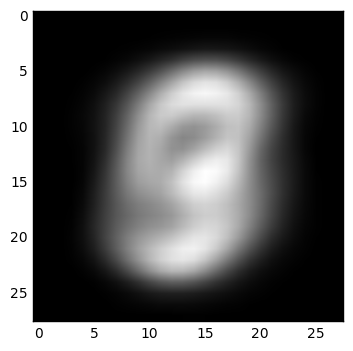
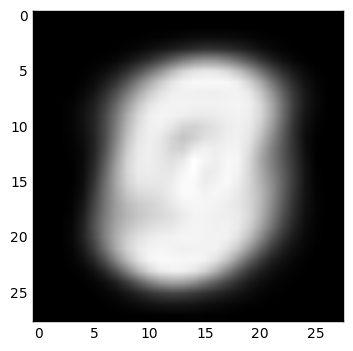 This shows off how one can use Dask collections to clean up and provide
pre-processing and feature generation on data in parallel before sending it to
TensorFlow. In our simple case we won't actually do any of this, but it's
useful in more real-world situations.
Finally, after doing our preprocessing on the distributed array of all of our
data we're going to collect images and labels together and batch them into
smaller chunks. Again we use some dask.array constructs and
[dask.delayed](http://dask.pydata.org/en/latest/delayed.html) when things get
messy.
```python
images = images.rechunk((10000, 784))
labels = labels.rechunk((10000, 10))
images = images.to_delayed().flatten().tolist()
labels = labels.to_delayed().flatten().tolist()
batches = [delayed([im, la]) for im, la in zip(images, labels)]
batches = c.compute(batches)
```
Now we have a few hundred pairs of NumPy arrays in distributed memory waiting
to be sent to a TensorFlow worker.
## Setting up TensorFlow workers alongside Dask workers
Dask workers are just normal Python processes. TensorFlow can launch itself
from a normal Python process. We've made a small function
[here](https://github.com/mrocklin/dask-tensorflow/blob/6fdadb6f52935788d593bdc01d441cfd9ad6a3be/dask_tensorflow/core.py)
that launches TensorFlow servers alongside Dask workers using Dask's ability to
run long-running tasks and maintain user-defined state. All together, this is
about 80 lines of code (including comments and docstrings) and allows us to
define our TensorFlow network on top of Dask as follows:
pip install git+https://github.com/mrocklin/dask-tensorflow
```python
from dask.distibuted import Client # we already had this above
client = Client('dask-scheduler-address:8786')
from dask_tensorflow import start_tensorflow
tf_spec, dask_spec = start_tensorflow(client, ps=1, worker=4, scorer=1)
>>> tf_spec.as_dict()
{'ps': ['192.168.100.1:2227'],
'scorer': ['192.168.100.2:2222'],
'worker': ['192.168.100.3:2223',
'192.168.100.4:2224',
'192.168.100.5:2225',
'192.168.100.6:2226']}
>>> dask_spec
{'ps': ['tcp://192.168.100.1:34471'],
'scorer': ['tcp://192.168.100.2:40623'],
'worker': ['tcp://192.168.100.3:33075',
'tcp://192.168.100.4:37123',
'tcp://192.168.100.5:32839',
'tcp://192.168.100.6:36822']}
```
This starts three groups of TensorFlow servers in the Dask worker processes.
TensorFlow will manage its own communication but co-exist right alongside Dask
in the same machines and in the same shared memory spaces (note that in the
specs above the IP addresses match but the ports differ).
This also sets up a normal Python queue along which Dask can safely send
information to TensorFlow. This is how we'll send those batches of training
data between the two services.
## Define TensorFlow Model and Distribute Roles
Now is the part of the blogpost where my expertise wanes. I'm just going to
copy-paste-and-modify a canned example from the TensorFlow documentation. This
is a simplistic model for this problem and it's entirely possible that I'm
making transcription errors. But still, it should get the point across. You
can safely ignore most of this code. Dask stuff gets interesting again
towards the bottom:
```python
import math
import tempfile
import time
from queue import Empty
IMAGE_PIXELS = 28
hidden_units = 100
learning_rate = 0.01
sync_replicas = False
replicas_to_aggregate = len(dask_spec['worker'])
def model(server):
worker_device = "/job:%s/task:%d" % (server.server_def.job_name,
server.server_def.task_index)
task_index = server.server_def.task_index
is_chief = task_index == 0
with tf.device(tf.train.replica_device_setter(
worker_device=worker_device,
ps_device="/job:ps/cpu:0",
cluster=tf_spec)):
global_step = tf.Variable(0, name="global_step", trainable=False)
# Variables of the hidden layer
hid_w = tf.Variable(
tf.truncated_normal(
[IMAGE_PIXELS * IMAGE_PIXELS, hidden_units],
stddev=1.0 / IMAGE_PIXELS),
name="hid_w")
hid_b = tf.Variable(tf.zeros([hidden_units]), name="hid_b")
# Variables of the softmax layer
sm_w = tf.Variable(
tf.truncated_normal(
[hidden_units, 10],
stddev=1.0 / math.sqrt(hidden_units)),
name="sm_w")
sm_b = tf.Variable(tf.zeros([10]), name="sm_b")
# Ops: located on the worker specified with task_index
x = tf.placeholder(tf.float32, [None, IMAGE_PIXELS * IMAGE_PIXELS])
y_ = tf.placeholder(tf.float32, [None, 10])
hid_lin = tf.nn.xw_plus_b(x, hid_w, hid_b)
hid = tf.nn.relu(hid_lin)
y = tf.nn.softmax(tf.nn.xw_plus_b(hid, sm_w, sm_b))
cross_entropy = -tf.reduce_sum(y_ * tf.log(tf.clip_by_value(y, 1e-10, 1.0)))
opt = tf.train.AdamOptimizer(learning_rate)
if sync_replicas:
if replicas_to_aggregate is None:
replicas_to_aggregate = num_workers
else:
replicas_to_aggregate = replicas_to_aggregate
opt = tf.train.SyncReplicasOptimizer(
opt,
replicas_to_aggregate=replicas_to_aggregate,
total_num_replicas=num_workers,
name="mnist_sync_replicas")
train_step = opt.minimize(cross_entropy, global_step=global_step)
if sync_replicas:
local_init_op = opt.local_step_init_op
if is_chief:
local_init_op = opt.chief_init_op
ready_for_local_init_op = opt.ready_for_local_init_op
# Initial token and chief queue runners required by the sync_replicas mode
chief_queue_runner = opt.get_chief_queue_runner()
sync_init_op = opt.get_init_tokens_op()
init_op = tf.global_variables_initializer()
train_dir = tempfile.mkdtemp()
if sync_replicas:
sv = tf.train.Supervisor(
is_chief=is_chief,
logdir=train_dir,
init_op=init_op,
local_init_op=local_init_op,
ready_for_local_init_op=ready_for_local_init_op,
recovery_wait_secs=1,
global_step=global_step)
else:
sv = tf.train.Supervisor(
is_chief=is_chief,
logdir=train_dir,
init_op=init_op,
recovery_wait_secs=1,
global_step=global_step)
sess_config = tf.ConfigProto(
allow_soft_placement=True,
log_device_placement=False,
device_filters=["/job:ps", "/job:worker/task:%d" % task_index])
# The chief worker (task_index==0) session will prepare the session,
# while the remaining workers will wait for the preparation to complete.
if is_chief:
print("Worker %d: Initializing session..." % task_index)
else:
print("Worker %d: Waiting for session to be initialized..." %
task_index)
sess = sv.prepare_or_wait_for_session(server.target, config=sess_config)
if sync_replicas and is_chief:
# Chief worker will start the chief queue runner and call the init op.
sess.run(sync_init_op)
sv.start_queue_runners(sess, [chief_queue_runner])
return sess, x, y_, train_step, global_step, cross_entropy
def ps_task():
with local_client() as c:
c.worker.tensorflow_server.join()
def scoring_task():
with local_client() as c:
# Scores Channel
scores = c.channel('scores', maxlen=10)
# Make Model
server = c.worker.tensorflow_server
sess, _, _, _, _, cross_entropy = model(c.worker.tensorflow_server)
# Testing Data
from tensorflow.examples.tutorials.mnist import input_data
mnist = input_data.read_data_sets('/tmp/mnist-data', one_hot=True)
test_data = {x: mnist.validation.images,
y_: mnist.validation.labels}
# Main Loop
while True:
score = sess.run(cross_entropy, feed_dict=test_data)
scores.append(float(score))
time.sleep(1)
def worker_task():
with local_client() as c:
scores = c.channel('scores')
num_workers = replicas_to_aggregate = len(dask_spec['worker'])
server = c.worker.tensorflow_server
queue = c.worker.tensorflow_queue
# Make model
sess, x, y_, train_step, global_step, _= model(c.worker.tensorflow_server)
# Main loop
while not scores or scores.data[-1] > 1000:
try:
batch = queue.get(timeout=0.5)
except Empty:
continue
train_data = {x: batch[0],
y_: batch[1]}
sess.run([train_step, global_step], feed_dict=train_data)
```
The last three functions defined here, `ps_task`, `scorer_task` and
`worker_task` are functions that we want to run on each of our three groups of
TensorFlow server types. The parameter server task just starts a long-running
task and passively joins the TensorFlow network:
```python
def ps_task():
with local_client() as c:
c.worker.tensorflow_server.join()
```
The scorer task opens up an [inter-worker
channel](http://distributed.readthedocs.io/en/latest/channels.html) of
communication named "scores", creates the TensorFlow model, then every second
scores the current state of the model against validation data. It reports the
score on the inter-worker channel:
```python
def scoring_task():
with local_client() as c:
scores = c.channel('scores') # inter-worker channel
# Make Model
sess, _, _, _, _, cross_entropy = model(c.worker.tensorflow_server)
...
while True:
score = sess.run(cross_entropy, feed_dict=test_data)
scores.append(float(score))
time.sleep(1)
```
The worker task makes the model, listens on the Dask-TensorFlow Queue for new
training data, and continues training until the last reported score is good
enough.
```python
def worker_task():
with local_client() as c:
scores = c.channel('scores')
queue = c.worker.tensorflow_queue
# Make model
sess, x, y_, train_step, global_step, _ = model(c.worker.tensorflow_server)
while scores.data[-1] > 1000:
batch = queue.get()
train_data = {x: batch[0],
y_: batch[1]}
sess.run([train_step, global_step], feed_dict=train_data)
```
We launch these tasks on the Dask workers that have the corresponding
TensorFlow servers (see `tf_spec` and `dask_spec` above):
```python
ps_tasks = [c.submit(ps_task, workers=worker)
for worker in dask_spec['ps']]
worker_tasks = [c.submit(worker_task, workers=addr, pure=False)
for addr in dask_spec['worker']]
scorer_task = c.submit(scoring_task, workers=dask_spec['scorer'][0])
```
This starts long-running tasks that just sit there, waiting for external
stimulation:
This shows off how one can use Dask collections to clean up and provide
pre-processing and feature generation on data in parallel before sending it to
TensorFlow. In our simple case we won't actually do any of this, but it's
useful in more real-world situations.
Finally, after doing our preprocessing on the distributed array of all of our
data we're going to collect images and labels together and batch them into
smaller chunks. Again we use some dask.array constructs and
[dask.delayed](http://dask.pydata.org/en/latest/delayed.html) when things get
messy.
```python
images = images.rechunk((10000, 784))
labels = labels.rechunk((10000, 10))
images = images.to_delayed().flatten().tolist()
labels = labels.to_delayed().flatten().tolist()
batches = [delayed([im, la]) for im, la in zip(images, labels)]
batches = c.compute(batches)
```
Now we have a few hundred pairs of NumPy arrays in distributed memory waiting
to be sent to a TensorFlow worker.
## Setting up TensorFlow workers alongside Dask workers
Dask workers are just normal Python processes. TensorFlow can launch itself
from a normal Python process. We've made a small function
[here](https://github.com/mrocklin/dask-tensorflow/blob/6fdadb6f52935788d593bdc01d441cfd9ad6a3be/dask_tensorflow/core.py)
that launches TensorFlow servers alongside Dask workers using Dask's ability to
run long-running tasks and maintain user-defined state. All together, this is
about 80 lines of code (including comments and docstrings) and allows us to
define our TensorFlow network on top of Dask as follows:
pip install git+https://github.com/mrocklin/dask-tensorflow
```python
from dask.distibuted import Client # we already had this above
client = Client('dask-scheduler-address:8786')
from dask_tensorflow import start_tensorflow
tf_spec, dask_spec = start_tensorflow(client, ps=1, worker=4, scorer=1)
>>> tf_spec.as_dict()
{'ps': ['192.168.100.1:2227'],
'scorer': ['192.168.100.2:2222'],
'worker': ['192.168.100.3:2223',
'192.168.100.4:2224',
'192.168.100.5:2225',
'192.168.100.6:2226']}
>>> dask_spec
{'ps': ['tcp://192.168.100.1:34471'],
'scorer': ['tcp://192.168.100.2:40623'],
'worker': ['tcp://192.168.100.3:33075',
'tcp://192.168.100.4:37123',
'tcp://192.168.100.5:32839',
'tcp://192.168.100.6:36822']}
```
This starts three groups of TensorFlow servers in the Dask worker processes.
TensorFlow will manage its own communication but co-exist right alongside Dask
in the same machines and in the same shared memory spaces (note that in the
specs above the IP addresses match but the ports differ).
This also sets up a normal Python queue along which Dask can safely send
information to TensorFlow. This is how we'll send those batches of training
data between the two services.
## Define TensorFlow Model and Distribute Roles
Now is the part of the blogpost where my expertise wanes. I'm just going to
copy-paste-and-modify a canned example from the TensorFlow documentation. This
is a simplistic model for this problem and it's entirely possible that I'm
making transcription errors. But still, it should get the point across. You
can safely ignore most of this code. Dask stuff gets interesting again
towards the bottom:
```python
import math
import tempfile
import time
from queue import Empty
IMAGE_PIXELS = 28
hidden_units = 100
learning_rate = 0.01
sync_replicas = False
replicas_to_aggregate = len(dask_spec['worker'])
def model(server):
worker_device = "/job:%s/task:%d" % (server.server_def.job_name,
server.server_def.task_index)
task_index = server.server_def.task_index
is_chief = task_index == 0
with tf.device(tf.train.replica_device_setter(
worker_device=worker_device,
ps_device="/job:ps/cpu:0",
cluster=tf_spec)):
global_step = tf.Variable(0, name="global_step", trainable=False)
# Variables of the hidden layer
hid_w = tf.Variable(
tf.truncated_normal(
[IMAGE_PIXELS * IMAGE_PIXELS, hidden_units],
stddev=1.0 / IMAGE_PIXELS),
name="hid_w")
hid_b = tf.Variable(tf.zeros([hidden_units]), name="hid_b")
# Variables of the softmax layer
sm_w = tf.Variable(
tf.truncated_normal(
[hidden_units, 10],
stddev=1.0 / math.sqrt(hidden_units)),
name="sm_w")
sm_b = tf.Variable(tf.zeros([10]), name="sm_b")
# Ops: located on the worker specified with task_index
x = tf.placeholder(tf.float32, [None, IMAGE_PIXELS * IMAGE_PIXELS])
y_ = tf.placeholder(tf.float32, [None, 10])
hid_lin = tf.nn.xw_plus_b(x, hid_w, hid_b)
hid = tf.nn.relu(hid_lin)
y = tf.nn.softmax(tf.nn.xw_plus_b(hid, sm_w, sm_b))
cross_entropy = -tf.reduce_sum(y_ * tf.log(tf.clip_by_value(y, 1e-10, 1.0)))
opt = tf.train.AdamOptimizer(learning_rate)
if sync_replicas:
if replicas_to_aggregate is None:
replicas_to_aggregate = num_workers
else:
replicas_to_aggregate = replicas_to_aggregate
opt = tf.train.SyncReplicasOptimizer(
opt,
replicas_to_aggregate=replicas_to_aggregate,
total_num_replicas=num_workers,
name="mnist_sync_replicas")
train_step = opt.minimize(cross_entropy, global_step=global_step)
if sync_replicas:
local_init_op = opt.local_step_init_op
if is_chief:
local_init_op = opt.chief_init_op
ready_for_local_init_op = opt.ready_for_local_init_op
# Initial token and chief queue runners required by the sync_replicas mode
chief_queue_runner = opt.get_chief_queue_runner()
sync_init_op = opt.get_init_tokens_op()
init_op = tf.global_variables_initializer()
train_dir = tempfile.mkdtemp()
if sync_replicas:
sv = tf.train.Supervisor(
is_chief=is_chief,
logdir=train_dir,
init_op=init_op,
local_init_op=local_init_op,
ready_for_local_init_op=ready_for_local_init_op,
recovery_wait_secs=1,
global_step=global_step)
else:
sv = tf.train.Supervisor(
is_chief=is_chief,
logdir=train_dir,
init_op=init_op,
recovery_wait_secs=1,
global_step=global_step)
sess_config = tf.ConfigProto(
allow_soft_placement=True,
log_device_placement=False,
device_filters=["/job:ps", "/job:worker/task:%d" % task_index])
# The chief worker (task_index==0) session will prepare the session,
# while the remaining workers will wait for the preparation to complete.
if is_chief:
print("Worker %d: Initializing session..." % task_index)
else:
print("Worker %d: Waiting for session to be initialized..." %
task_index)
sess = sv.prepare_or_wait_for_session(server.target, config=sess_config)
if sync_replicas and is_chief:
# Chief worker will start the chief queue runner and call the init op.
sess.run(sync_init_op)
sv.start_queue_runners(sess, [chief_queue_runner])
return sess, x, y_, train_step, global_step, cross_entropy
def ps_task():
with local_client() as c:
c.worker.tensorflow_server.join()
def scoring_task():
with local_client() as c:
# Scores Channel
scores = c.channel('scores', maxlen=10)
# Make Model
server = c.worker.tensorflow_server
sess, _, _, _, _, cross_entropy = model(c.worker.tensorflow_server)
# Testing Data
from tensorflow.examples.tutorials.mnist import input_data
mnist = input_data.read_data_sets('/tmp/mnist-data', one_hot=True)
test_data = {x: mnist.validation.images,
y_: mnist.validation.labels}
# Main Loop
while True:
score = sess.run(cross_entropy, feed_dict=test_data)
scores.append(float(score))
time.sleep(1)
def worker_task():
with local_client() as c:
scores = c.channel('scores')
num_workers = replicas_to_aggregate = len(dask_spec['worker'])
server = c.worker.tensorflow_server
queue = c.worker.tensorflow_queue
# Make model
sess, x, y_, train_step, global_step, _= model(c.worker.tensorflow_server)
# Main loop
while not scores or scores.data[-1] > 1000:
try:
batch = queue.get(timeout=0.5)
except Empty:
continue
train_data = {x: batch[0],
y_: batch[1]}
sess.run([train_step, global_step], feed_dict=train_data)
```
The last three functions defined here, `ps_task`, `scorer_task` and
`worker_task` are functions that we want to run on each of our three groups of
TensorFlow server types. The parameter server task just starts a long-running
task and passively joins the TensorFlow network:
```python
def ps_task():
with local_client() as c:
c.worker.tensorflow_server.join()
```
The scorer task opens up an [inter-worker
channel](http://distributed.readthedocs.io/en/latest/channels.html) of
communication named "scores", creates the TensorFlow model, then every second
scores the current state of the model against validation data. It reports the
score on the inter-worker channel:
```python
def scoring_task():
with local_client() as c:
scores = c.channel('scores') # inter-worker channel
# Make Model
sess, _, _, _, _, cross_entropy = model(c.worker.tensorflow_server)
...
while True:
score = sess.run(cross_entropy, feed_dict=test_data)
scores.append(float(score))
time.sleep(1)
```
The worker task makes the model, listens on the Dask-TensorFlow Queue for new
training data, and continues training until the last reported score is good
enough.
```python
def worker_task():
with local_client() as c:
scores = c.channel('scores')
queue = c.worker.tensorflow_queue
# Make model
sess, x, y_, train_step, global_step, _ = model(c.worker.tensorflow_server)
while scores.data[-1] > 1000:
batch = queue.get()
train_data = {x: batch[0],
y_: batch[1]}
sess.run([train_step, global_step], feed_dict=train_data)
```
We launch these tasks on the Dask workers that have the corresponding
TensorFlow servers (see `tf_spec` and `dask_spec` above):
```python
ps_tasks = [c.submit(ps_task, workers=worker)
for worker in dask_spec['ps']]
worker_tasks = [c.submit(worker_task, workers=addr, pure=False)
for addr in dask_spec['worker']]
scorer_task = c.submit(scoring_task, workers=dask_spec['scorer'][0])
```
This starts long-running tasks that just sit there, waiting for external
stimulation:
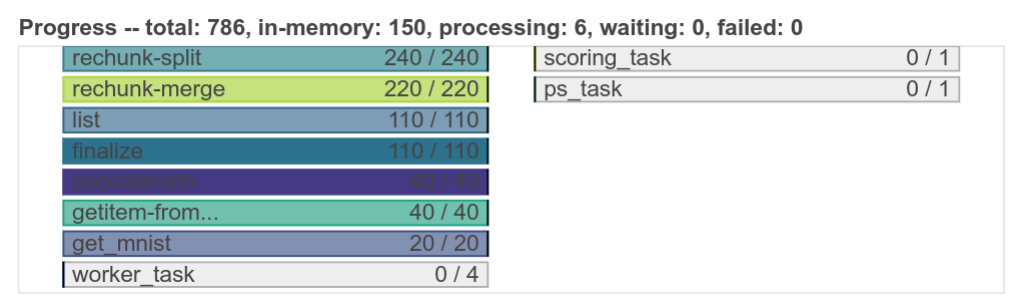 Finally we construct a function to dump each of our batches of data
from our Dask.array (from the very beginning of this post) into the
Dask-TensorFlow queues on our workers. We make sure to only run these tasks
where the Dask-worker has a corresponding TensorFlow training worker:
```python
from distributed.worker_client import get_worker
def transfer_dask_to_tensorflow(batch):
worker = get_worker()
worker.tensorflow_queue.put(batch)
dump = c.map(transfer_dask_to_tensorflow, batches,
workers=dask_spec['worker'], pure=False)
```
If we want to we can track progress in our local session by subscribing to the
same inter-worker channel:
```python
scores = c.channel('scores')
```
We can use this to repeatedly dump data into the workers over and over again
until they converge.
```python
while scores.data[-1] > 1000:
dump = c.map(transfer_dask_to_tensorflow, batches,
workers=dask_spec['worker'], pure=False)
wait(dump)
```
## Conclusion
We discussed a non-trivial way to use TensorFlow to accomplish distributed
machine learning. We used Dask to support TensorFlow in a few ways:
1. Trivially setup the TensorFlow network
2. Prepare and clean data
3. Coordinate progress and stopping criteria
We found it convenient that Dask and TensorFlow could play nicely with each
other. Dask supported TensorFlow without getting in the way. The fact that
both libraries play nicely within Python and the greater PyData stack
(NumPy/Pandas) makes it trivial to move data between them without costly or
complex tricks.
Additionally, we didn't have to work to integrate these two systems. There is
no need for a separate collaborative effort to integrate Dask and TensorFlow at
a core level. Instead, they are designed in such a way so as to foster this
type of interaction without special attention or effort.
This is also the first blogpost that I've written that, from a Dask
perspective, uses some more complex features like [long running
tasks](http://distributed.readthedocs.io/en/latest/task-launch.html#submit-tasks-from-worker)
or publishing state between workers with
[channels](http://distributed.readthedocs.io/en/latest/channels.html). These
more advanced features are invaluable when creating more complex/bespoke
parallel computing systems, such as are often found within companies.
## What we could have done better
From a deep learning perspective this example is both elementary and
incomplete. It would have been nice to train on a dataset that was larger and
more complex than MNIST. Also it would be nice to see the effects of training
over time and the performance of using different numbers of workers. In
defense of this blogpost I can only claim that Dask shouldn't affect any of
these scaling results, because TensorFlow is entirely in control at these
stages and TensorFlow already has plenty of published scaling information.
Generally speaking though, this experiment was done in a weekend afternoon and
the blogpost was written in a few hours shortly afterwards. If anyone is
interested in performing and publishing about a more serious distributed deep
learning experiment with TensorFlow and Dask I would be happy to support them
on the Dask side. I think that there is plenty to learn here about best
practices.
## Acknowledgements
The following individuals contributed to the construction of this blogpost:
- [Stephan Hoyer](http://stephanhoyer.com/) contributed with conversations
about how TensorFlow is used in practice and with concrete experience on
deployment.
- [Will Warner](https://github.com/electronwill) and
[Erik Welch](https://github.com/eriknw) both provided valuable editing and
language recommendations
Finally we construct a function to dump each of our batches of data
from our Dask.array (from the very beginning of this post) into the
Dask-TensorFlow queues on our workers. We make sure to only run these tasks
where the Dask-worker has a corresponding TensorFlow training worker:
```python
from distributed.worker_client import get_worker
def transfer_dask_to_tensorflow(batch):
worker = get_worker()
worker.tensorflow_queue.put(batch)
dump = c.map(transfer_dask_to_tensorflow, batches,
workers=dask_spec['worker'], pure=False)
```
If we want to we can track progress in our local session by subscribing to the
same inter-worker channel:
```python
scores = c.channel('scores')
```
We can use this to repeatedly dump data into the workers over and over again
until they converge.
```python
while scores.data[-1] > 1000:
dump = c.map(transfer_dask_to_tensorflow, batches,
workers=dask_spec['worker'], pure=False)
wait(dump)
```
## Conclusion
We discussed a non-trivial way to use TensorFlow to accomplish distributed
machine learning. We used Dask to support TensorFlow in a few ways:
1. Trivially setup the TensorFlow network
2. Prepare and clean data
3. Coordinate progress and stopping criteria
We found it convenient that Dask and TensorFlow could play nicely with each
other. Dask supported TensorFlow without getting in the way. The fact that
both libraries play nicely within Python and the greater PyData stack
(NumPy/Pandas) makes it trivial to move data between them without costly or
complex tricks.
Additionally, we didn't have to work to integrate these two systems. There is
no need for a separate collaborative effort to integrate Dask and TensorFlow at
a core level. Instead, they are designed in such a way so as to foster this
type of interaction without special attention or effort.
This is also the first blogpost that I've written that, from a Dask
perspective, uses some more complex features like [long running
tasks](http://distributed.readthedocs.io/en/latest/task-launch.html#submit-tasks-from-worker)
or publishing state between workers with
[channels](http://distributed.readthedocs.io/en/latest/channels.html). These
more advanced features are invaluable when creating more complex/bespoke
parallel computing systems, such as are often found within companies.
## What we could have done better
From a deep learning perspective this example is both elementary and
incomplete. It would have been nice to train on a dataset that was larger and
more complex than MNIST. Also it would be nice to see the effects of training
over time and the performance of using different numbers of workers. In
defense of this blogpost I can only claim that Dask shouldn't affect any of
these scaling results, because TensorFlow is entirely in control at these
stages and TensorFlow already has plenty of published scaling information.
Generally speaking though, this experiment was done in a weekend afternoon and
the blogpost was written in a few hours shortly afterwards. If anyone is
interested in performing and publishing about a more serious distributed deep
learning experiment with TensorFlow and Dask I would be happy to support them
on the Dask side. I think that there is plenty to learn here about best
practices.
## Acknowledgements
The following individuals contributed to the construction of this blogpost:
- [Stephan Hoyer](http://stephanhoyer.com/) contributed with conversations
about how TensorFlow is used in practice and with concrete experience on
deployment.
- [Will Warner](https://github.com/electronwill) and
[Erik Welch](https://github.com/eriknw) both provided valuable editing and
language recommendations