---
blogpost: true
date: Jul 23, 2015
title: Custom Parallel Workflows
tags: scipy, Python, Programming, dask
description: dask graphs <3 for loops
---
_This work is supported by [Continuum Analytics](http://continuum.io)
and the [XDATA Program](http://www.darpa.mil/program/XDATA)
as part of the [Blaze Project](http://blaze.pydata.org)_
**tl;dr: We motivate the expansion of parallel programming beyond big
collections. We discuss the usability custom of dask graphs.**
## Recent Parallel Work Focuses on Big Collections
Parallel databases, Spark, and Dask collections all provide large distributed
collections that handle parallel computation for you. You put data into the
collection, program with a small set of operations like `map` or `groupby`, and
the collections handle the parallel processing. This idea has become so
popular that there are now a dozen projects promising big and friendly Pandas
clones.
This is good. These collections provide usable, high-level interfaces for a
large class of common problems.
## Custom Workloads
However, many workloads are too complex for these collections. Workloads might
be complex either because they come from sophisticated algorithms
(as we saw in a [recent post on SVD](/work/2015/06/26/Complex-Graphs/)) or because they come from the real world,
where problems tend to be messy.
In these cases I tend to see people do two things
1. Fall back to `multiprocessing`, `MPI` or some other explicit form of parallelism
2. Perform mental gymnastics to fit their problem into Spark using a
clever choice of keys. These cases often fail to acheive much speedup.
## Direct Dask Graphs
Historically I've recommended the manual construction of dask graphs in these
cases. Manual construction of dask graphs lets you specify fairly arbitrary
workloads that then use the dask schedulers to execute in parallel.
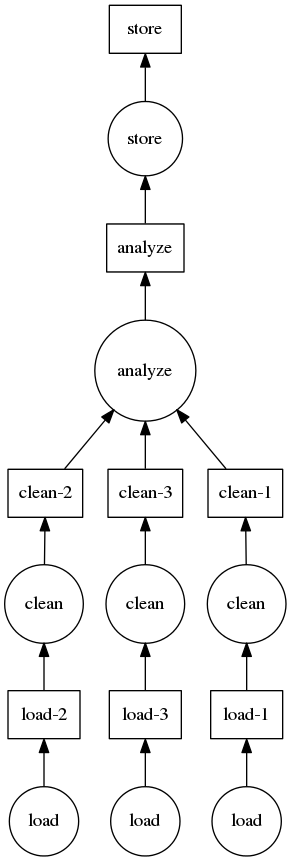
The [dask docs](dask.pydata.org/en/latest/custom-graphs.html) hold the
following example of a simple data processing pipeline:
 ```python
def load(filename):
...
def clean(data):
...
def analyze(sequence_of_data):
...
def store(result):
...
dsk = {'load-1': (load, 'myfile.a.data'),
'load-2': (load, 'myfile.b.data'),
'load-3': (load, 'myfile.c.data'),
'clean-1': (clean, 'load-1'),
'clean-2': (clean, 'load-2'),
'clean-3': (clean, 'load-3'),
'analyze': (analyze, ['clean-%d' % i for i in [1, 2, 3]]),
'store': (store, 'analyze')}
from dask.multiprocessing import get
get(dsk, 'store') # executes in parallel
```
Feedback from users is that this is interesting and powerful but that
programming directly in dictionaries is not inutitive, doesn't integrate well
with IDEs, and is prone to error.
## Introducing dask.do
To create the same custom parallel workloads using normal-ish Python code we
use the [dask.do](http://dask.pydata.org/en/latest/imperative.html) function.
This `do` function turns any normal Python function into a delayed version that
adds to a dask graph. The `do` function lets us rewrite the computation above
as follows:
```python
from dask import do
loads = [do(load)('myfile.a.data'),
do(load)('myfile.b.data'),
do(load)('myfile.c.data')]
cleaned = [do(clean)(x) for x in loads]
analysis = do(analyze)(cleaned)
result = do(store)(analysis)
```
The explicit function calls here don't perform work directly; instead they
build up a dask graph which we can then execute in parallel with our choice of
scheduler.
```python
from dask.multiprocessing import get
result.compute(get=get)
```
This interface was suggested by [Gael Varoquaux](http://gael-varoquaux.info/)
based on his experience with [joblib](https://pythonhosted.org/joblib/). It
was implemented by [Jim Crist](http://jcrist.github.io/)
in [PR (#408)](https://github.com/ContinuumIO/dask/pull/408).
## Example: Nested Cross Validation
I sat down with a Machine learning student, [Gabriel
Krummenacher](http://people.inf.ethz.ch/kgabriel/) and worked to parallelize a
small code to do nested cross validation. Below is a comparison of a
sequential implementation that has been parallelized using `dask.do`:
You can safely skip reading this code in depth. The take-away is that it's
somewhat involved but that the addition of parallelism is light.
```python
def load(filename):
...
def clean(data):
...
def analyze(sequence_of_data):
...
def store(result):
...
dsk = {'load-1': (load, 'myfile.a.data'),
'load-2': (load, 'myfile.b.data'),
'load-3': (load, 'myfile.c.data'),
'clean-1': (clean, 'load-1'),
'clean-2': (clean, 'load-2'),
'clean-3': (clean, 'load-3'),
'analyze': (analyze, ['clean-%d' % i for i in [1, 2, 3]]),
'store': (store, 'analyze')}
from dask.multiprocessing import get
get(dsk, 'store') # executes in parallel
```
Feedback from users is that this is interesting and powerful but that
programming directly in dictionaries is not inutitive, doesn't integrate well
with IDEs, and is prone to error.
## Introducing dask.do
To create the same custom parallel workloads using normal-ish Python code we
use the [dask.do](http://dask.pydata.org/en/latest/imperative.html) function.
This `do` function turns any normal Python function into a delayed version that
adds to a dask graph. The `do` function lets us rewrite the computation above
as follows:
```python
from dask import do
loads = [do(load)('myfile.a.data'),
do(load)('myfile.b.data'),
do(load)('myfile.c.data')]
cleaned = [do(clean)(x) for x in loads]
analysis = do(analyze)(cleaned)
result = do(store)(analysis)
```
The explicit function calls here don't perform work directly; instead they
build up a dask graph which we can then execute in parallel with our choice of
scheduler.
```python
from dask.multiprocessing import get
result.compute(get=get)
```
This interface was suggested by [Gael Varoquaux](http://gael-varoquaux.info/)
based on his experience with [joblib](https://pythonhosted.org/joblib/). It
was implemented by [Jim Crist](http://jcrist.github.io/)
in [PR (#408)](https://github.com/ContinuumIO/dask/pull/408).
## Example: Nested Cross Validation
I sat down with a Machine learning student, [Gabriel
Krummenacher](http://people.inf.ethz.ch/kgabriel/) and worked to parallelize a
small code to do nested cross validation. Below is a comparison of a
sequential implementation that has been parallelized using `dask.do`:
You can safely skip reading this code in depth. The take-away is that it's
somewhat involved but that the addition of parallelism is light.
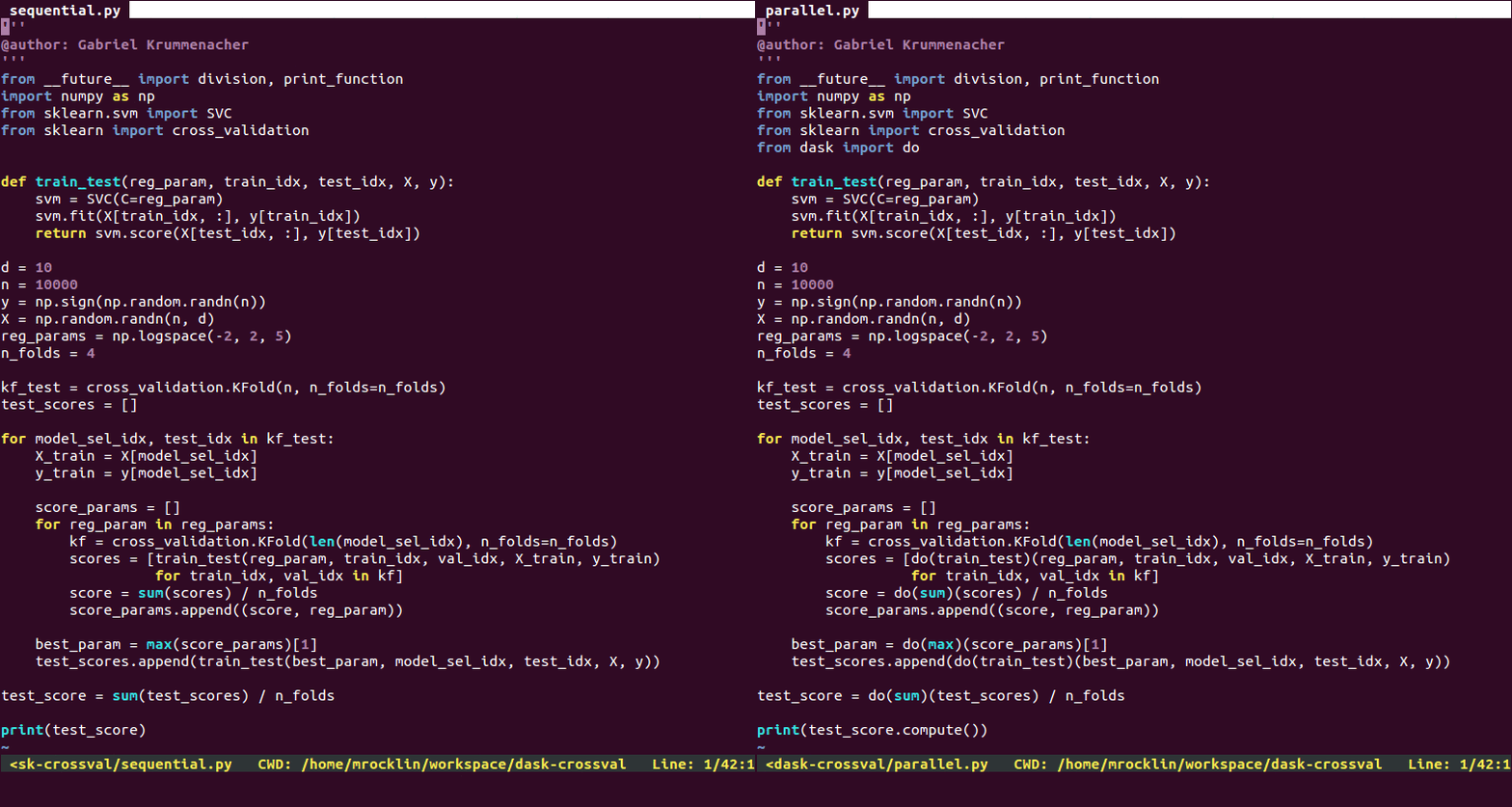 The parallel version runs about four times faster on my notebook.
Disclaimer: The sequential version presented here is just a downgraded version
of the parallel code, hence why they look so similar. This is available
[on github](http://github.com/mrocklin/dask-crossval).
So the result of our normal imperative-style for-loop code is a fully
parallelizable dask graph. We visualize that graph below.
test_score.visualize()
The parallel version runs about four times faster on my notebook.
Disclaimer: The sequential version presented here is just a downgraded version
of the parallel code, hence why they look so similar. This is available
[on github](http://github.com/mrocklin/dask-crossval).
So the result of our normal imperative-style for-loop code is a fully
parallelizable dask graph. We visualize that graph below.
test_score.visualize()
 ## Help
Is this a useful interface? It would be great if people could try this out
and [generate feedback](http://github.com/ContinuumIO/dask/issues/new) on `dask.do`.
For more information on `dask.do` see the
[dask imperative documentation](http://dask.pydata.org/en/latest/imperative.html).
## Help
Is this a useful interface? It would be great if people could try this out
and [generate feedback](http://github.com/ContinuumIO/dask/issues/new) on `dask.do`.
For more information on `dask.do` see the
[dask imperative documentation](http://dask.pydata.org/en/latest/imperative.html).