
This work is supported by Anaconda Inc.
I’m pleased to announce the release of Dask version 0.19.0. This is a major release with bug fixes and new features. The last release was 0.18.2 on July 23rd. This blogpost outlines notable changes since the last release blogpost for 0.18.0 on June 14th.
You can conda install Dask:
conda install dask
or pip install from PyPI:
pip install dask[complete] --upgrade
Full changelogs are available here:
Notable Changes#
A ton of work has happened over the past two months, but most of the changes are small and diffuse. Stability, feature parity with upstream libraries (like Numpy and Pandas), and performance have all significantly improved, but in ways that are difficult to condense into blogpost form.
That being said, here are a few of the more exciting changes in the new release.
Python Versions#
We’ve dropped official support for Python 3.4 and added official support for Python 3.7.
Deploy on Hadoop Clusters#
Over the past few months Jim Crist has bulit a suite of tools to deploy applications on YARN, the primary cluster manager used in Hadoop clusters.
Conda-pack: packs up Conda environments for redistribution to distributed clusters, especially when Python or Conda may not be present.
Skein: easily launches and manages YARN applications from non-JVM systems
Dask-Yarn: a thin library around Skein to launch and manage Dask clusters
Jim has written about Skein and Dask-Yarn in two recent blogposts:
Implement Actors#
Some advanced workloads want to directly manage and mutate state on workers. A task-based framework like Dask can be forced into this kind of workload using long-running-tasks, but it’s an uncomfortable experience.
To address this we’ve added an experimental Actors framework to Dask alongside the standard task-scheduling system. This provides reduced latencies, removes scheduling overhead, and provides the ability to directly mutate state on a worker, but loses niceties like resilience and diagnostics. The idea to adopt Actors was shamelessly stolen from the Ray Project :)
class Counter:
    def __init__(self):
        self.n = 0

    def increment(self):
        self.n += 1
        return self.n

counter = client.submit(Counter, actor=True).result()

>>> future = counter.increment()
>>> future.result()
1
You can read more about actors in the Actors documentation.
Dashboard improvements#
The Dask dashboard is a critical tool to understand distributed performance. There are a few accessibility issues that trip up beginning users that we’ve addressed in this release.
Save task stream plots#
You can now save a task stream record by wrapping a computation in the
get_task_stream context manager.
from dask.distributed import Client, get_task_stream
client = Client(processes=False)

import dask
df = dask.datasets.timeseries()

with get_task_stream(plot='save', filename='my-task-stream.html') as ts:
    df.x.std().compute()
>>> ts.data
[{'key': "('make-timeseries-edc372a35b317f328bf2bb5e636ae038', 0)",
  'nbytes': 8175440,
  'startstops': [('compute', 1535661384.2876947, 1535661384.3366017)],
  'status': 'OK',
  'thread': 139754603898624,
  'worker': 'inproc://192.168.50.100/15417/2'},

  ...
This gives you the start and stop time of every task on every worker done during that time. It also saves that data as an HTML file that you can share with others. This is very valuable for communicating performance issues within a team. I typically upload the HTML file as a gist and then share it with rawgit.com
$ gist my-task-stream.html
https://gist.github.com/f48a121bf03c869ec586a036296ece1a
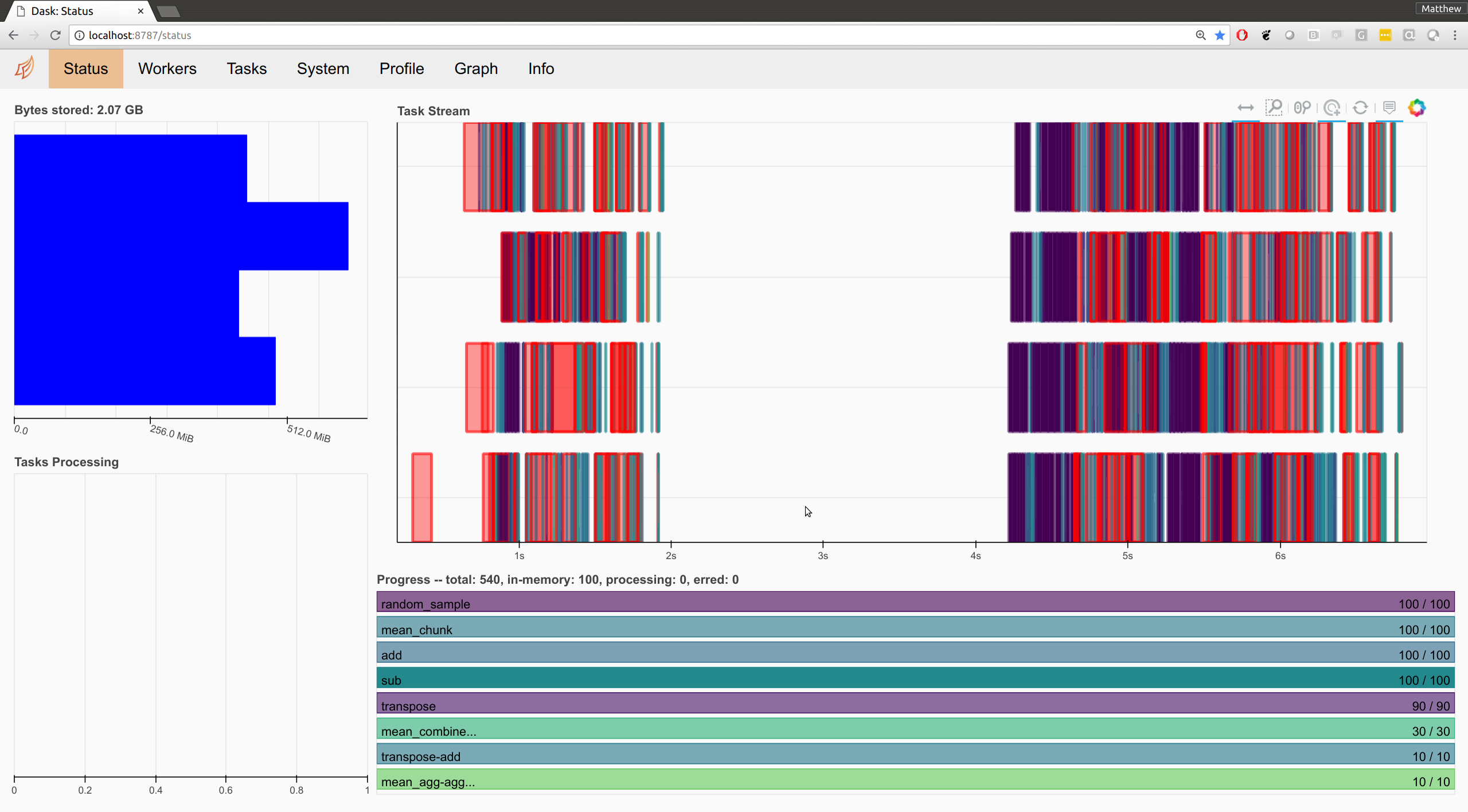
Robust to different screen sizes#
The Dashboard’s layout was designed to be used on a single screen, side-by-side with a Jupyter notebook. This is how many Dask developers operate when working on a laptop, however it is not how many users operate for one of two reasons:
They are working in an office setting where they have several screens
They are new to Dask and uncomfortable splitting their screen into two halves
In these cases the styling of the dashboard becomes odd. Fortunately, Luke Canavan and Derek Ludwig recently improved the CSS for the dashboard considerably, allowing it to switch between narrow and wide screens. Here is a snapshot.
Jupyter Lab Extension#
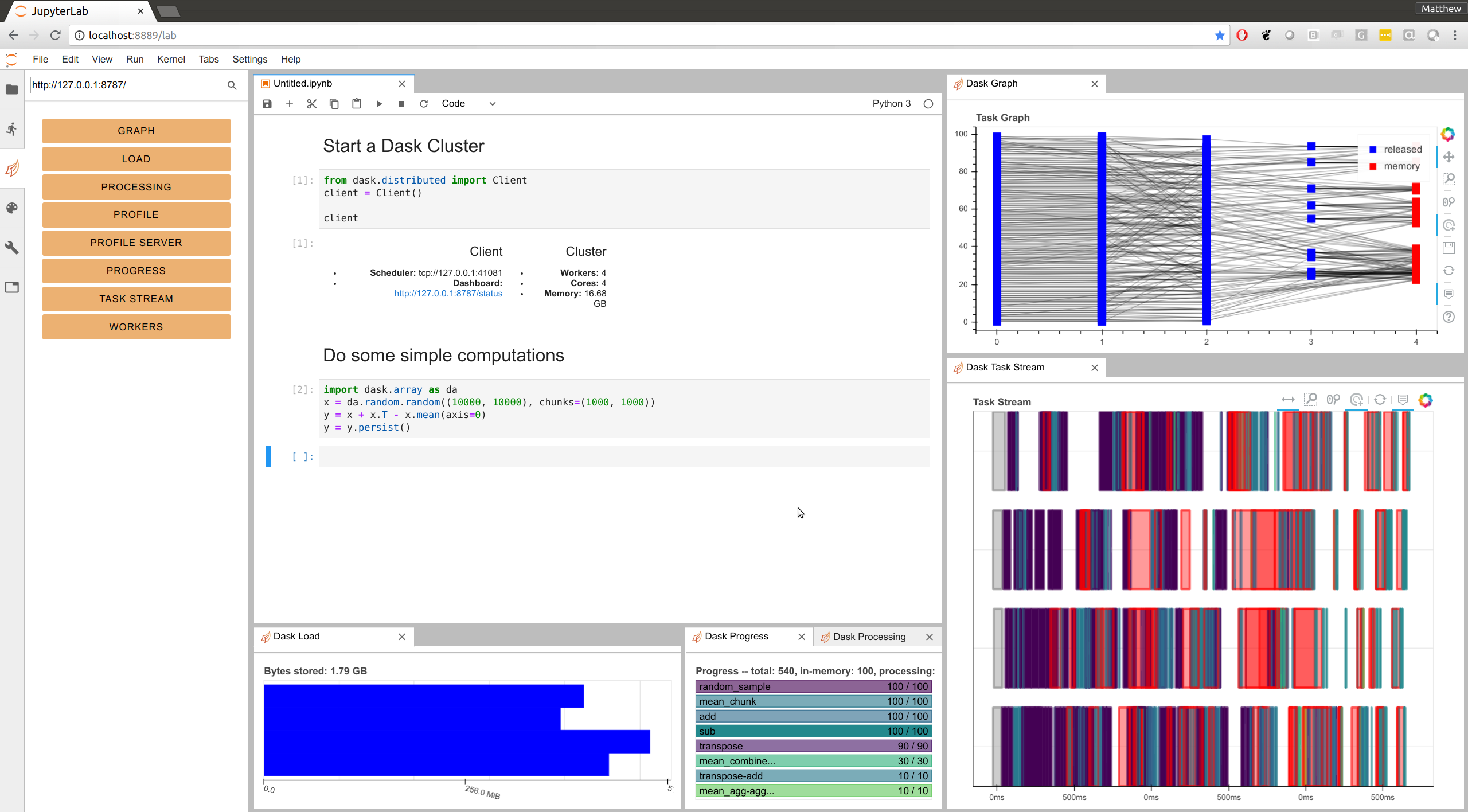
You can now embed Dashboard panes directly within Jupyter Lab using the newly updated dask-labextension.
jupyter labextension install dask-labextension
This allows you to layout your own dashboard directly within JupyterLab. You
can combine plots from different pages, control their sizing, and so on. You
will need to provide the address of the dashboard server
(http://localhost:8787 by default on local machines) but after that
everything should persist between sessions. Now when I open up JupyterLab and
start up a Dask Client, I get this:
Thanks to Ian Rose for doing most of the work here.
Outreach#
Dask Stories#
People who use Dask have been writing about their experiences at Dask Stories. In the last couple months the following people have written about and contributed their experience:
Hydrological Modelling at the National Center for Atmospheric Research by Joe Hamman
Satellite Imagery Processing at the Space Science and Engineering Center by David Hoese
These stories help people understand where Dask is and is not applicable, and provide useful context around how it gets used in practice. We welcome further contributions to this project. It’s very valuable to the broader community.
Dask Examples#
The Dask-Examples repository maintains easy-to-run examples using Dask on a small machine, suitable for an entry-level laptop or for a small cloud instance. These are hosted on mybinder.org and are integrated into our documentation. A number of new examples have arisen recently, particularly in machine learning. We encourage people to try them out by clicking the link below.

Other Projects#
The dask-image project was recently released. It includes a number of image processing routines around dask arrays.
This project is mostly maintained by John Kirkham.
Dask-ML saw a recent bugfix release
The TPOT library for automated machine learning recently published a new release that adds Dask support to parallelize their model training. More information is available on the TPOT documentation
Acknowledgements#
Since June 14th, the following people have contributed to the following repositories:
The core Dask repository for parallel algorithms:
Anderson Banihirwe
Andre Thrill
Aurélien Ponte
Christoph Moehl
Cloves Almeida
Daniel Rothenberg
Danilo Horta
Davis Bennett
Elliott Sales de Andrade
Eric Bonfadini
GPistre
George Sakkis
Guido Imperiale
Hans Moritz Günther
Henrique Ribeiro
Hugo
Irina Truong
Itamar Turner-Trauring
Jacob Tomlinson
James Bourbeau
Jan Margeta
Javad
Jeremy Chen
Jim Crist
Joe Hamman
John Kirkham
John Mrziglod
Julia Signell
Marco Rossi
Mark Harfouche
Martin Durant
Matt Lee
Matthew Rocklin
Mike Neish
Robert Sare
Scott Sievert
Stephan Hoyer
Tobias de Jong
Tom Augspurger
WZY
Yu Feng
Yuval Langer
minebogy
nmiles2718
rtobar
The dask/distributed repository for distributed computing:
Anderson Banihirwe
Aurélien Ponte
Bartosz Marcinkowski
Dave Hirschfeld
Derek Ludwig
Dror Birkman
Guillaume EB
Jacob Tomlinson
Joe Hamman
John Kirkham
Loïc Estève
Luke Canavan
Marius van Niekerk
Martin Durant
Matt Nicolls
Matthew Rocklin
Mike DePalatis
Olivier Grisel
Phil Tooley
Ray Bell
Tom Augspurger
Yu Feng
The dask/dask-examples repository for easy-to-run examples:
Albert DeFusco
Dan Vatterott
Guillaume EB
Matthew Rocklin
Scott Sievert
Tom Augspurger
mholtzscher
Comments
comments powered by Disqus