
This work is supported by Continuum Analytics and the Data Driven Discovery Initiative from the Moore Foundation.
Summary#
We measure the performance of Dask’s distributed scheduler for a variety of different workloads under increasing scales of both problem and cluster size. This helps to answer questions about dask’s scalability and also helps to educate readers on the sorts of computations that scale well.
We will vary our computations in a few ways to see how they stress performance. We consider the following:
Computational and communication patterns like embarrassingly parallel, fully sequential, bulk communication, many-small communication, nearest neighbor, tree reductions, and dynamic graphs.
Varying task duration ranging from very fast (microsecond) tasks, to 100ms and 1s long tasks. Faster tasks make it harder for the central scheduler to keep up with the workers.
Varying cluster size from one two-core worker to 256 two-core workers and varying dataset size which we scale linearly with the number of workers. This means that we’re measuring weak scaling.
Varying APIs between tasks, multidimensional arrays and dataframes all of which have cases in the above categories but depend on different in-memory computational systems like NumPy or Pandas.
We will start with benchmarks for straight tasks, which are the most flexible system and also the easiest to understand. This will help us to understand scaling limits on arrays and dataframes.
Note: we did not tune our benchmarks or configuration at all for these experiments. They are well below what is possible, but perhaps representative of what a beginning user might experience upon setting up a cluster without expertise or thinking about configuration.
you can safely skip this section if you’re in a rush
This is a technical document, not a marketing piece. These benchmarks adhere to the principles laid out in this blogpost and attempt to avoid those pitfalls around developer bias. In particular the following are true:
We decided on a set of benchmarks before we ran them on a cluster
We did not improve the software or tweak the benchmarks after seeing the results. These were run on the current release of Dask in the wild that was put out weeks ago, not on a development branch.
The computations were constructed naively, as a novice would write them. They were not tweaked for extra performance.
The cluster was configured naively, without attention to scale or special parameters
We estimate that expert use would result in about a 5-10x scaling improvement over what we’ll see. We’ll detail how to improve scaling with expert methods at the bottom of the post.
All that being said the author of this blogpost is paid to write this software and so you probably shouldn’t trust him. We invite readers to explore things independently. All configuration, notebooks, plotting code, and data are available below:
dask-kubernetes for cluster deployment
Tasks#
We start by benchmarking the task scheduling API. Dask’s task scheduling APIs are at the heart of the other “big data” APIs (like dataframes). We start with tasks because they’re the simplest and most raw representation of Dask. Mostly we’ll run the following functions on integers, but you could fill in any function here, like a pandas dataframe method or sklearn routine.
import time

def inc(x):
    return x + 1

def add(x, y):
    return x + y

def slowinc(x, delay=0.1):
    time.sleep(delay)
    return x + 1

def slowadd(x, y, delay=0.1):
    time.sleep(delay)
    return x + y

def slowsum(L, delay=0.1):
    time.sleep(delay)
    return sum(L)
Embarrassingly Parallel Tasks#
We run the following code on our cluster and measure how long they take to complete:
futures = client.map(slowinc, range(4 * n), delay=1) # 1s delay
wait(futures)
futures = client.map(slowinc, range(100 * n_cores)) # 100ms delay
wait(futures)
futures = client.map(inc, range(n_cores * 200))     # fast
wait(futures)
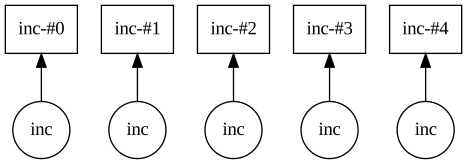
We see that for fast tasks the system can process around 2000-3000 tasks per second. This is mostly bound by scheduler and client overhead. Adding more workers into the system doesn’t give us any more tasks per second. However if our tasks take any amount of time (like 100ms or 1s) then we see decent speedups.
If you switch to linear scales on the plots, you’ll see that as we get out to 512 cores we start to slow down by about a factor of two. I’m surprised to see this behavior (hooray benchmarks) because all of Dask’s scheduling decisions are independent of cluster size. My first guess is that the scheduler may be being swamped with administrative messages, but we’ll have to dig in a bit deeper here.
Tree Reduction#
Not all computations are embarrassingly parallel. Many computations have dependencies between them. Consider a tree reduction, where we combine neighboring elements until there is only one left. This stresses task dependencies and small data movement.
from dask import delayed

L = range(2**7 * n)
while len(L) > 1:  # while there is more than one element left
    # add neighbors together
    L = [delayed(slowadd)(a, b) for a, b in zip(L[::2], L[1::2])]

L[0].compute()
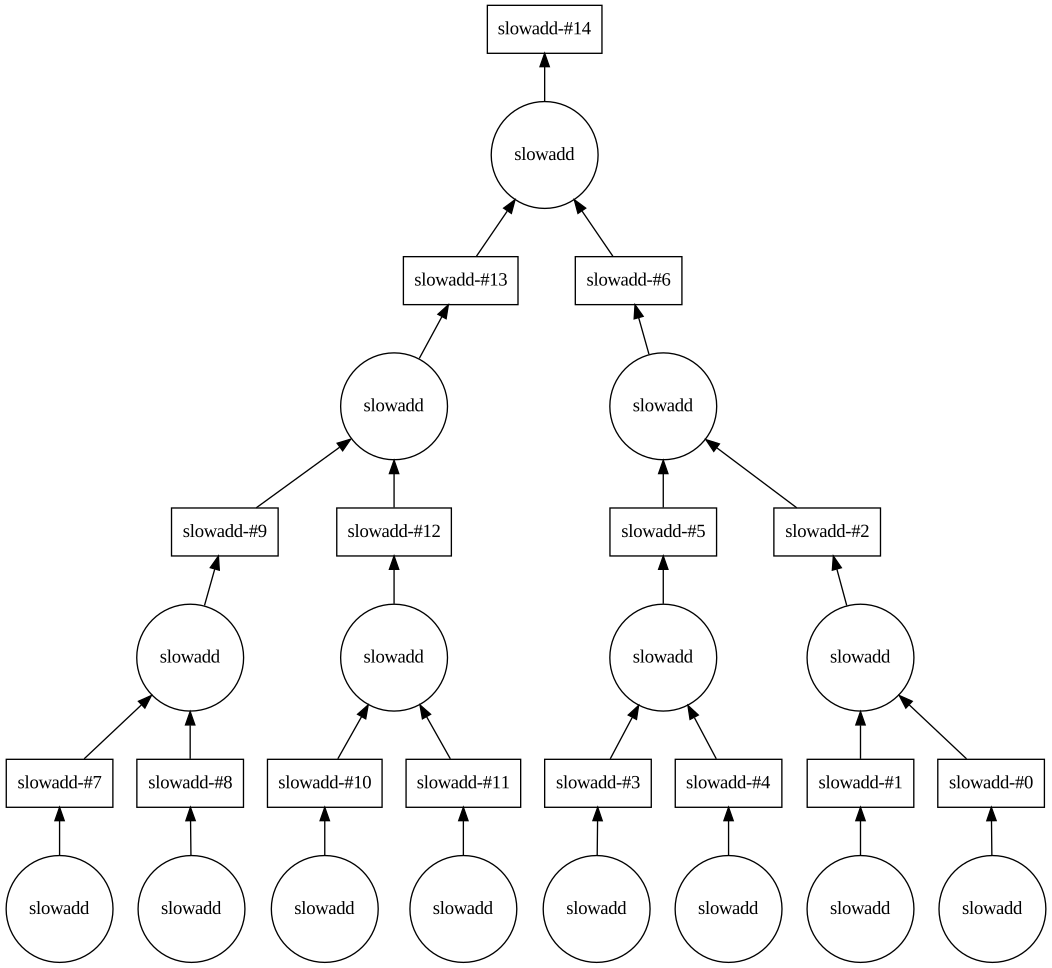
We see similar scaling to the embarrassingly parallel case. Things proceed linearly until they get to around 3000 tasks per second, at which point they fall behind linear scaling. Dask doesn’t seem to mind dependencies, even custom situations like this one.
Nearest Neighbor#
Nearest neighbor computations are common in data analysis when you need to share a bit of data between neighboring elements, such as frequently occurs in timeseries computations in dataframes or overlapping image processing in arrays or PDE computations.
L = range(20 * n)
L = client.map(slowadd, L[:-1], L[1:])
L = client.map(slowadd, L[:-1], L[1:])
wait(L)
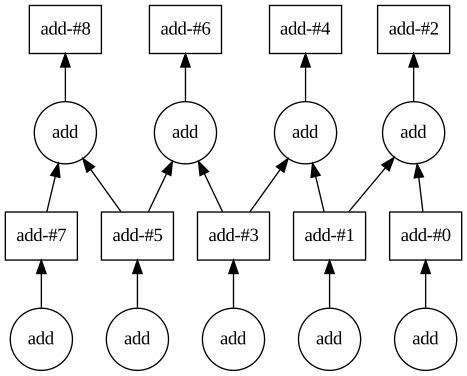
Scaling is similar to the tree reduction case. Interesting dependency structures don’t incur significant overhead or scaling costs.
Sequential#

We consider a computation that isn’t parallel at all, but is instead highly sequential. Increasing the number of workers shouldn’t help here (there is only one thing to do at a time) but this does demonstrate the extra stresses that arise from a large number of workers. Note that we have turned off task fusion for this, so here we’re measuring how many roundtrips can occur between the scheduler and worker every second.
x = 1

for i in range(100):
    x = delayed(inc)(x)

x.compute()
So we get something like 100 roundtrips per second, or around 10ms roundtrip latencies. It turns out that a decent chunk of this cost was due to an optimization; workers prefer to batch small messages for higher throughput. In this case that optimization hurts us. Still though, we’re about 2-4x faster than video frame-rate here (video runs at around 24Hz or 40ms between frames).
Client in the loop#
Finally we consider a reduction that consumes whichever futures finish first and adds them together. This is an example of using client-side logic within the computation, which is often helpful in complex algorithms. This also scales a little bit better because there are fewer dependencies to track within the scheduler. The client takes on a bit of the load.
from dask.distributed import as_completed
futures = client.map(slowinc, range(n * 20))

pool = as_completed(futures)
batches = pool.batches()

while True:
    try:
        batch = next(batches)
        if len(batch) == 1:
            batch += next(batches)
    except StopIteration:
        break
    future = client.submit(slowsum, batch)
    pool.add(future)
Tasks: Complete#
We show most of the plots from above for comparison.
Arrays#
When we combine NumPy arrays with the task scheduling system above we get dask.array, a distributed multi-dimensional array. This section shows computations like the last section (maps, reductions, nearest-neighbor), but now these computations are motivated by actual data-oriented computations and involve real data movement.
We make a square array with somewhat random data. This array scales with the number of cores. We cut it into uniform chunks of size 2000 by 2000.
N = int(5000 * math.sqrt(n_cores))
x = da.random.randint(0, 10000, size=(N, N), chunks=(2000, 2000))
x = x.persist()
wait(x)
Creating this array is embarrassingly parallel. There is an odd corner in the graph here that I’m not able to explain.
Elementwise Computation#
We perform some numerical computation element-by-element on this array.
y = da.sin(x) ** 2 + da.cos(x) ** 2
y = y.persist()
wait(y)
This is also embarrassingly parallel. Each task here takes around 300ms (the time it takes to call this on a single 2000 by 2000 numpy array chunk).
Reductions#
We sum the array. This is implemented as a tree reduction.
x.std().compute()
Random Access#
We get a single element from the array. This shouldn’t get any faster with more workers, but it may get slower depending on how much base-line load a worker adds to the scheduler.
x[1234, 4567].compute()
We get around 400-800 bytes per second, which translates to response times of 10-20ms, about twice the speed of video framerate. We see that performance does degrade once we have a hundred or so active connections.
Communication#
We add the array to its transpose. This forces different chunks to move around the network so that they can add to each other. Roughly half of the array moves on the network.
y = x + x.T
y = y.persist()
wait(y)
The task structure of this computation is something like nearest-neighbors. It has a regular pattern with a small number of connections per task. It’s really more a test of the network hardware, which we see does not impose any additional scaling limitations (this looks like normal slightly-sub-linear scaling).
Rechunking#
Sometimes communication is composed of many small transfers. For example if you have a time series of images so that each image is a chunk, you might want to rechunk the data so that all of the time values for each pixel are in a chunk instead. Doing this can be very challenging because every output chunk requires a little bit of data from every input chunk, resulting in potentially n-squared transfers.
y = x.rechunk((20000, 200)).persist()
wait(y)

y = y.rechunk((200, 20000)).persist()
wait(y)
This computation can be very hard. We see that dask does it more slowly than fast computations like reductions, but it still scales decently well up to hundreds of workers.
Nearest Neighbor#
Dask.array includes the ability to overlap small bits of neighboring blocks to enable functions that require a bit of continuity like derivatives or spatial smoothing functions.
y = x.map_overlap(slowinc, depth=1, delay=0.1).persist()
wait(y)
Array Complete#
DataFrames#
We can combine Pandas Dataframes with Dask to obtain Dask dataframes, distributed tables. This section will be much like the last section on arrays but will instead focus on pandas-style computations.
We make an array of random integers with ten columns and two million rows per core, but into chunks of size one million. We turn this into a dataframe of integers:
x = da.random.randint(0, 10000, size=(N, 10), chunks=(1000000, 10))
df = dd.from_dask_array(x).persist()
wait(df)
Elementwise#
We can perform 100ms tasks or try out a bunch of arithmetic.
y = df.map_partitions(slowinc, meta=df).persist()
wait(y)
y = (df[0] + 1 + 2 + 3 + 4 + 5 + 6 + 7 + 8 + 9 + 10).persist()
wait(y)
Random access#
Similarly we can try random access with loc.
df.loc[123456].compute()
Reductions#
We can try reductions along the full dataset or a single series:
df.std().compute()
df[0].std().compute()
Groupby aggregations like df.groupby(...).column.mean() operate very
similarly to reductions, just with slightly more complexity.
df.groupby(0)[1].mean().compute()
Shuffles#
However operations like df.groupby(...).apply(...) are much harder to
accomplish because we actually need to construct the groups. This requires a
full shuffle of all of the data, which can be quite expensive.
This is also the same operation that occurs when we sort or call set_index.
df.groupby(0).apply(len).compute() # this would be faster as df.groupby(0).size()
y = df.set_index(1).persist()
wait(y)
This still performs decently and scales well out to a hundred or so workers.
Timeseries operations#
Timeseries operations often require nearest neighbor computations. Here we look at rolling aggregations, but cumulative operations, resampling, and so on are all much the same.
y = df.rolling(5).mean().persist()
wait(y)
Dataframes: Complete#
Analysis#
Let’s start with a few main observations:
The longer your individual tasks take, the better Dask (or any distributed system) will scale. As you increase the number of workers you should also endeavor to increase average task size, for example by increasing the in-memory size of your array chunks or dataframe partitions.
The Dask scheduler + Client currently maxes out at around 3000 tasks per second. Another way to put this is that if our computations take 100ms then we can saturate about 300 cores, which is more-or-less what we observe here.
Adding dependencies is generally free in modest cases such as in a reduction or nearest-neighbor computation. It doesn’t matter what structure your dependencies take, as long as parallelism is still abundant.
Adding more substantial dependencies, such as in array rechunking or dataframe shuffling, can be more costly, but dask collection algorithms (array, dataframe) are built to maintain scalability even at scale.
The scheduler seems to slow down at 256 workers, even for long task
lengths. This suggests that we may have an overhead issue that needs to be resolved.
Expert Approach#
So given our experience here, let’s now tweak settings to make Dask run well. We want to avoid two things:
Lots of independent worker processes
Lots of small tasks
So lets change some things:
Bigger workers: Rather than have 256 two-core workers lets deploy 32 sixteen-core workers.
Bigger chunks: Rather than have 2000 by 2000 numpy array chunks lets bump this up to 10,000 by 10,000.
Rather than 1,000,000 row Pandas dataframe partitions let’s bump this up to 10,000,000.
These sizes are still well within comfortable memory limits. Each is about a Gigabyte in our case.
When we make these changes we find that all metrics improve at larger scales. Some notable improvements are included in a table below (sorry for not having pretty plots in this case).
| Benchmark | Small | Big | Unit |
| Tasks: Embarrassingly parallel | 3500 | 3800 | tasks/s |
| Array: Elementwise sin(x)**2 + cos(x)**2 | 2400 | 6500 | MB/s |
| DataFrames: Elementwise arithmetic | 9600 | 66000 | MB/s |
| Arrays: Rechunk | 4700 | 4800 | MB/s |
| DataFrames: Set index | 1400 | 1000 | MB/s |
We see that for some operations we can get significant improvements (dask.dataframe is now churning through data at 60/s) and for other operations that are largely scheduler or network bound this doesn’t strongly improve the situation (and sometimes hurts).
Still though, even with naive settings we’re routinely pushing through 10s of gigabytes a second on a modest cluster. These speeds are available for a very wide range of computations.
Final thoughts#
Hopefully these notes help people to understand Dask’s scalability. Like all tools it has limits, but even under normal settings Dask should scale well out to a hundred workers or so. Once you reach this limit you might want to start taking other factors into consideration, especially threads-per-worker and block size, both of which can help push well into the thousands-of-cores range.
The included notebooks are self contained, with code to both run and time the computations as well as produce the Bokeh figures. I would love to see other people reproduce these benchmarks (or others!) on different hardware or with different settings.
Tooling#
This blogpost made use of the following tools:
Dask-kubernetes: for deploying clusters of varying sizes on Google compute engine
gcsfs: for storage on Google cloud storage
Comments
comments powered by Disqus